Select An Org
Anypoint Studio Define Metadata doesn't work, error: Tooling instance could not be started
Publish Date: Mar 2, 2024
Resolution
SYMPTOM
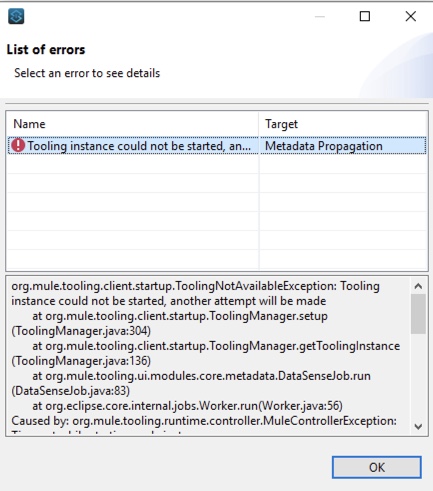
In Studio 7.3.3. when defining Metadata for any component Studio starts calculating the metadata then after a while the following error is thrown in the logs:
org.mule.tooling.client.startup.ToolingNotAvailableException: Tooling instance could not be started, another attempt will be made
at org.mule.tooling.client.startup.ToolingManager.setup(ToolingManager.java:304)
at org.mule.tooling.client.startup.ToolingManager.getToolingInstance(ToolingManager.java:136)
at org.mule.tooling.ui.modules.core.metadata.DataSenseJob.run(DataSenseJob.java:83)
at org.eclipse.core.internal.jobs.Worker.run(Worker.java:56)
Caused by: org.mule.tooling.runtime.controller.MuleControllerException: Timeout while starting mule instance
at org.mule.tooling.runtime.controller.MuleController.start(MuleController.java:146)
at org.mule.tooling.client.startup.ToolingManager.setup(ToolingManager.java:296)
... 3 more
Caused by: org.awaitility.core.ConditionTimeoutException: Condition with lambda expression in org.mule.tooling.runtime.controller.MuleController was not fulfilled within 90 seconds.
at org.awaitility.core.ConditionAwaiter.await(ConditionAwaiter.java:104)
at org.awaitility.core.CallableCondition.await(CallableCondition.java:79)
at org.awaitility.core.CallableCondition.await(CallableCondition.java:27)
at org.awaitility.core.ConditionFactory.until(ConditionFactory.java:809)
at org.awaitility.core.ConditionFactory.until(ConditionFactory.java:785)
at org.mule.tooling.runtime.controller.MuleController.start(MuleController.java:130)
... 4 more
The error can also be seen within Anypoint Studio.
CAUSE
Antivirus software is installed and running on the same system as Anypoint Studio. When metadata is being defined the Antivirus software locks the metadata tool threads when it tries to calculate the number of inbounds/outbounds threads. If the thread lock is too long, a timeout occurs and kills the tool process.
SOLUTION
The best solution would be to work with your support team to white list Anypoint Studio in your Antivirus software. Uninstall the offending antivirus software is also a fix but is not recommend.
Increasing Studio Default startup Timeout
Knowledge Article Number
001123484
Did this article solve your issue?
Let us know so we can improve!
