組織を選択
How to Accept Terms of Service for Facebook Ad Account in Advertising Audiences
公開日: Feb 10, 2025
説明
The Terms of Services (TOS) for a Facebook Ad Account must be accepted before any audiences can be created successfully. The Terms of Services will only need to be accepted once for every Ad Account by the user who authorized the ad account within Advertising Audiences.
If you are having difficulties accepting the TOS make sure that you have the correct permission levels within Business Manager on the desired Ad Account. If you do not have the correct permissions you can send a unique URL to a user with the correct permissions for them the accept on their end.
解決策
Facebook Ad Account Permission Levels to Accept the TOS
- Ad Account Admin or Ad Account Advertiser
To accept the TOS within Advertising Audiences:
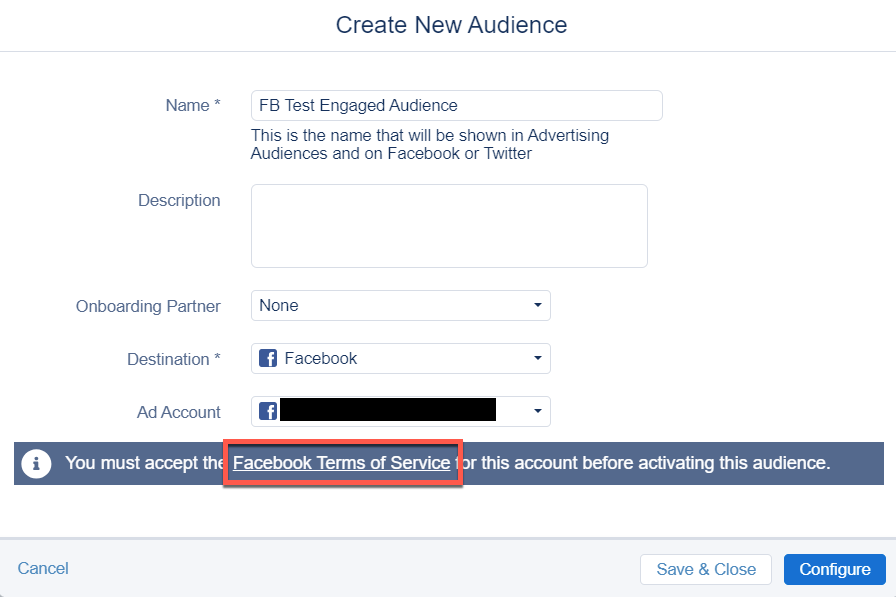
- Within Advertising Audiences click Create Audience in the upper righthand corner.
- Under Destination use the drop down to select Facebook.
- Select your Facebook Ad Account.
- Towards the bottom of the pop screen a blue bar will appear asking you to accept the TOS for the ad account.
- Click on the Accept TOS hyperlink, this will send you to a new page where you can accept the TOS.
Note: Not seeing this popup means it's already been accepted and no action is needed.
ナレッジ記事番号
000381600
この記事で問題は解決されましたか?
ご意見をお待ちしております。
