組織を選択
Salesforce CPQ (Managed Package): Include Additional Instructions on Product Features in the QLE
公開日: Aug 4, 2026
説明
解決策
- Navigate to the Product Feature Object. (Go to Setup>Object Manager>Product Feature>Fields & Relationship)
- Create a new Field type ’Text Area’
- Enter a label of your choosing i.e. Additional Product Instruction but API must be ‘AdditionalInstructions__c
- Add the field to your Product Feature Page Layout.
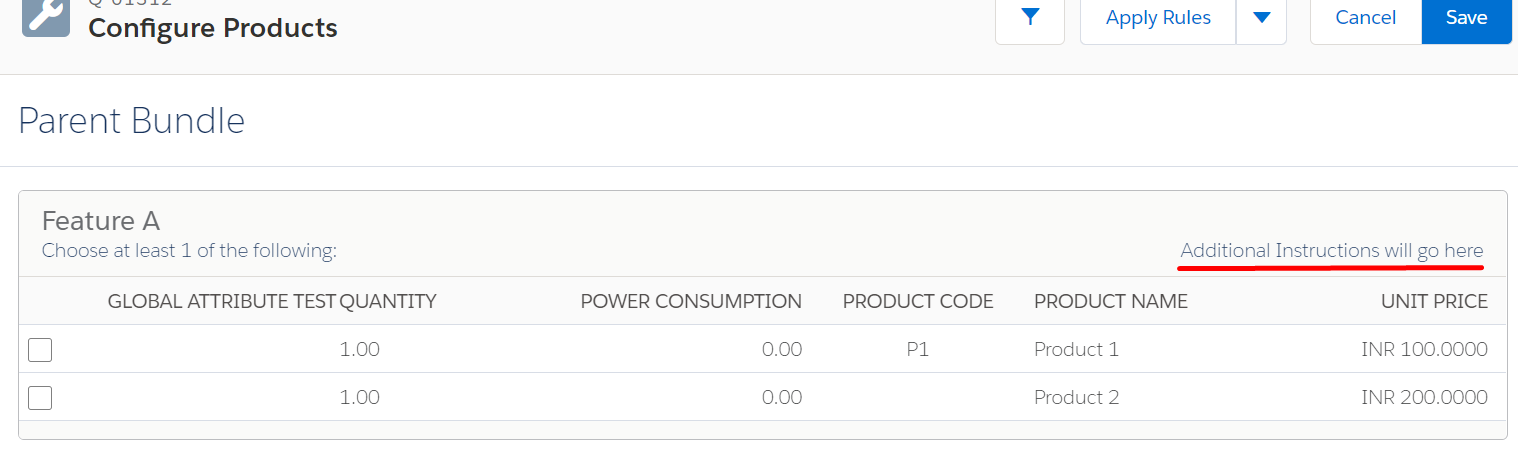
Example:
After following the implementation steps ensure that the field is added to the Product Feature Layout.
If you add any text in this field, the text will appear below the Feature Name but is right justified in the UI. Based on the bundle setup a left-aligned message such as "Choose at least 1 of the following:" may appear. [This will appear if, on the Product Feature Record, you have "Min Options" set to any non-zero value.]
Depending on your browser zoom level, the text will wrap as you zoom in.
ナレッジ記事番号
000383950
この記事で問題は解決されましたか?
ご意見をお待ちしております。
