組織を選択
Salesforceデータローダーエラー: UTF-8 BOM (バイトオーダーマーク) により発生するエラー 「CSV Error: Invalid CSV file format (CSV エラー: CSV ファイル形式が無効です)」
公開日: Apr 3, 2026
説明
データローダの新バージョン (バージョン 28 以降) は、UTF-8 BOM (バイトオーダーマーク) 形式を使用してエンコードされたファイルをサポートしていないため、次のエラーが発生します。
「CSV Error: Invalid CSV file format.Please select a different file.Error getting header row from the CSV file (CSV エラー: CSV ファイル形式が無効です。別のファイルを選択してください。CSV ファイルからヘッダー行を取得中にエラーが発生しました)」
UTF-8 BOM (バイトオーダーマーク) は、UT8でエンコードされたファイルの最初に加えられる「」で表される隠し文字です。バージョン28以降のデータローダーはBOMを含むファイルをサポートしません。
注意: テキストエディタまたは Excel の設定によっては、BOM 文字を表示できません。
ファイルに BOM 文字が含まれているかどうかを判断するには、W3C Internationalization Checker を使用します。
また、WindowsのNotepadでCSVファイルを開くと、ステータスバーの右下で使用されているエンコーディングを確認できます。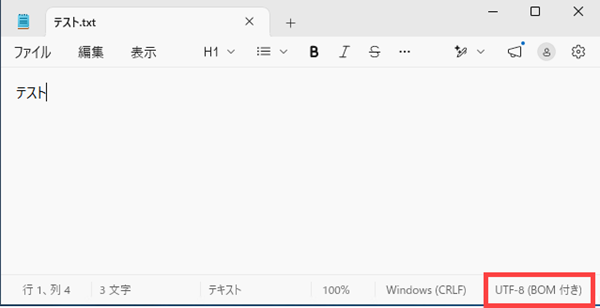
解決策
Unicode の CSV ファイルを読み込む場合のエラー回避策
オプション 1: BOM を手動で削除する (ファイルを保存し直して、2 バイト文字を維持する)。
1.ファイルを Excel で開き、必要に応じて変更します。
2.ファイルを「Unicode テキスト」形式で保存します。
3.ファイルを閉じて、もう一度開きます。
4.次の属性を設定してファイルをもう一度保存します。
- ファイル拡張子を .csv に設定します。
- [名前を付けて保存] のファイルの種類を [すべてのファイル] に設定します。
- エンコードを [UTF-8] に設定します。
5.ファイルを保存した後で、再度開かないでください。
6.新たに作成した .csv ファイルを使用して、データローダのアクションを通常どおり実行します。
オプション 2: BOM (バイトオーダーマーク) なしで CSV ファイルを保存する
1.BOM 付きと BOM なしの両方をサポートするテキストエディタで CSV ファイルを開きます。
2.BOM なしで保存し直します (例: Notepad++ で、[エンコード] | [UTF-8 でエンコード] を選択して、ファイルを保存)。
CSV ファイルを BOM なしで保存すると、データローダ v28 以降に読み込むことができます。
注意: 外部の DB やアプリケーションを使用している場合は、サードパーティのドキュメントで、CSV ファイルを BOM なしで保存する方法を確認してください。
BOMなしのUTF-8エンコーディングでCSVファイルを保存してもいまだエラーが表示される場合には、Salesforceカスタマーサポートまでご連絡ください。
BOM の追加情報
詳細は、「W3C standards (W3C 標準)」を参照してください。W3C では、BOM を自動的に削除する perl スクリプトの作成に関する提案も行っています。
BOM を自動的に削除するカスタムソリューションは、Salesforce カスタマーサポートでサポートされません。
Unicodeメソッドを使用した csv ファイルの変換がうまくいかず、次のエラーがユーザーに表示されることがあります。
「Invalid CSV file format.Please select a different file.Error reading row #: the number of data columns exceeds the number of columns in the header. (CSV ファイル形式が無効です。別のファイルを選択してください。行# の読み取りエラー: データの列数がヘッダーの列数を超えています。)」
変換のこの問題を解決するには、CSV ファイルの内容を Google スプレッドシートに貼り付けます。
1.Google スプレッドシート (https://www.google.com/sheets/about/) にアクセスします (既存の Google アカウントが必要です)。
2.CSV ファイルの内容をコピーして貼り付けます。
3.ファイルを .CSV 形式で保存してダウンロードします。
4.ファイルを直接データローダにアップロードします (ファイルを開かず、変更が行われないようにします)。
2.CSV ファイルの内容をコピーして貼り付けます。
3.ファイルを .CSV 形式で保存してダウンロードします。
4.ファイルを直接データローダにアップロードします (ファイルを開かず、変更が行われないようにします)。
注意: このエラーは通常、区切り文字にセミコロンを使用する PC の地域設定により、ヨーロッパ諸国で発生します。
BOMを含むファイルの最初に次の文字が表示されます。 ヘッダー行の最初にこれらの文字が表示されるようであれば、そのファイルはBOMを含むため、再保存される必要があります。
- ^
- `
- ~
- ¡
- ¢
- «
- µ
- ¸
- Ä
- Ã
- Ð
- Ò
ナレッジ記事番号
000383918
この記事で問題は解決されましたか?
ご意見をお待ちしております。
