組織を選択
多要素認証の問題のトラブルシューティング
公開日: Jun 17, 2026
説明
Salesforce を使用した多要素認証の有効化
重要:
- Android ユーザは、「ZXing Team」のバーコードスキャナをインストールする必要があります。
- モバイルデバイスの時刻は、コンピュータの時刻および公式時刻 (www.time.gov) と常に一致している必要があります。一致していないと、無効なトークンエラーが生成されます。
- 無効な試行が 10 回行われる (正しいユーザ名とパスワード、無効な時間ベースのトークンを 10 回使用する) と、ユーザは 1 時間ロックされます。
- Salesforce システム管理者ではないユーザが、組織内の 多要素認証のサポートを提供できるようにします。たとえば、多要素認証に通常使用しているデバイスを紛失したか、忘れたユーザのために、社内のヘルプデスクのスタッフが仮の確認コードを生成できるようにするとします。ヘルプデスクのスタッフメンバーに「ユーザインターフェースで多要素認証を管理」権限を割り当てると、スタッフはコードを生成し、他の 多要素認証任務でエンドユーザをサポートできます。 多要素認証の管理任務の委任
- 通常、多要素認証に使用しているデバイスにアクセスできない場合、仮の ID 確認コードの発行を Salesforce システム管理者に依頼します。このコードは 1 ~ 24 時間有効です。システム管理者が有効期限を設定しますが、期限前にコードが不要になった場合はユーザが失効にすることもできます。手順については、「仮のコードによる ID の検証」 /「仮の ID 確認コードの生成」を参照してください。
質問: 1 つのアカウントを、2 つのデバイスの認証アプリケーションに同時に接続できますか?
回答: いいえ。一度に接続できる認証アプリケーションはユーザログインあたり 1 つだけです。別のデバイスのアプリケーションに接続する場合は、現在のデバイスからアカウントへの接続を解除します。
MFA FAQ リソース:
https://www.salesforce.com/content/dam/web/en_us/www/documents/guides/mfa-quick-admin-guide-ja.pdf
https://help.salesforce.com/articleView?id=000352937&type=1&mode=1
解決策
以下は、ユーザが 2 要素認証の問題に直面したときにシステム管理者が実行できるトラブルシューティングの手順です。
- Salesforce Classic UI から、[設定] | [ユーザの管理] | [ユーザ] を選択し、ユーザ名をクリックします。
- 新しい Lightning UI から、右上のギア | [設定のホーム] | [ユーザ] | [ユーザ] をクリックし、ユーザ名をクリックします。
- 影響を受けているユーザレコードで [アプリケーション登録: ワンタイムパスワードジェネレータ] (時間ベースのトークン) 項目を見つけます。
- [アプリケーション登録: ワンタイムパスワードジェネレータ] (時間ベースのトークン) の横にある [削除] オプションをクリックします。これを削除すると、ログイン時にユーザによってスキャンされる新しい QR コードが生成されます。
- ユーザは、モバイルデバイスに Salesforce Authenticator をダウンロードし、QR コードスキャナがあることを確認する必要があります。
- ユーザは、Salesforce ユーザ名とパスワードを使用してログインした後で、QR コードをスキャンしてトークンを生成する必要があります。
- ユーザは、すでにモバイルデバイスにインストールされている Salesforce Authenticator アプリケーションを使用して QR コードをスキャンし、時間ベースのトークンコードを作成する必要があります。
- QR コードがスキャンされたらすぐに、影響を受けているユーザに認証アプリケーションから生成されたコードを QR コードの下に表示されているボックスに入力してもらいます。
- コードが入力されたら [確認してログイン] ボタンをクリックします。これにより、ユーザがログインします。
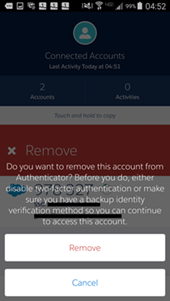
注意: 古い時間ベースのトークンを置き換えようとしたときにモバイルデバイスでエラーが発生した場合、左にスワイプして時間トークンを削除してください。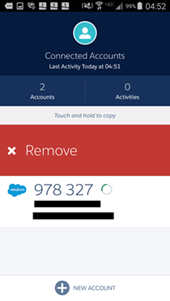
「Introduction to Salesforce Authenticator」 (Salesforce Authenticator の概要) 動画チュートリアル
「Setup Two-Factor」(2 要素の設定) 動画チュートリアル (3 分間) https://www.youtube.com/watch?v=ppnEDjwc9x4&feature=youtu.be
ユーザアカウントを使用して Salesforce Authenticator アプリケーションを設定する手順については、こちらを参照してください。
信頼できる場所を有効にする方法と転送通知を使用する方法
- モバイルデバイス設定から [場所] を有効にする必要があります。
- 新しいデバイスまたはブラウザからログインすると、Salesforce Authenticator アプリケーションから通知が送信されます。以下を参照してください。
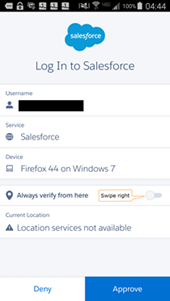
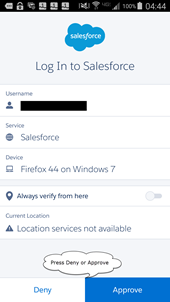
信頼できる場所の確認と信頼できる場所をクリアする方法
1.Salesforce Authenticator アプリケーションを開きます。
2.信頼できる場所を確認するアカウントをタップします。
3.右上のギアアイコンをタップします。
4.実行するアクションのボタンをタップします。
2.信頼できる場所を確認するアカウントをタップします。
3.右上のギアアイコンをタップします。
4.実行するアクションのボタンをタップします。
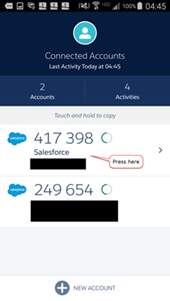
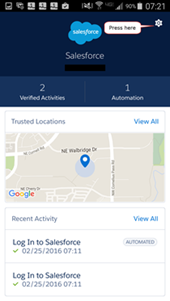
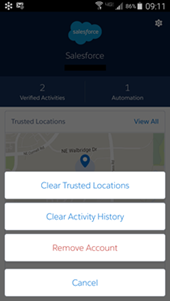
ユーザーが Salesforce Authenticator からプッシュ通知を受け取れなかったり、モバイルデータ通信ができない状態だったり、インターネットに接続されていない場合の対応方法は以下のとおりです。
- Salesforce Authenticator の「モバイルデバイスを確認」ページで「お困りですか?」をクリックします。
- 「別の検証方法を使用してください」を選択します。
- 「認証アプリケーションからのコードを使用」を選択します (この確認がない場合もあります)。
- Salesforce 認証アプリケーションからコードを取得して入力します。
MFA の設定と割り当ての概要動画は、公式の Salesforce 動画ウォークスルー (英語) を参照してください。
考慮事項: Salesforce システムは、Google 社、 Microsoft 社のような他の認証アプリケーションを利用することもできますが、サードパーティのアプリケーションという扱いになるため、弊社のサポートは提供していません。
ナレッジ記事番号
000386089
この記事で問題は解決されましたか?
ご意見をお待ちしております。
