Vælg en organisation
Service Cloud Voice Billing FAQ
Udgivelsesdato: Apr 28, 2023
Service Cloud Voice Billing FAQ
What is Service Cloud Voice?
- Service Cloud Voice is a feature for the Service Console that offers some advanced capabilities, such as:
- Gives agents and supervisors real-time Omni-Channel visibility from the console.
- Integrates telephony and shows calls all on one platform—the Service Cloud platform.
- Boosts agent productivity and shortens call times with fewer clicks and less data entry and wrap-up tasks.
- Implements a phone channel quickly without code, APIs, or research into which third-party telephony systems to use.
When did we start providing this service?
- July 2020
How is it billed?
- Platform Minutes, IVR Utterances - Overages: Depending on the quantity of Service Cloud Voice licenses you purchase and the size of the package , you are allowed to use up to a certain amount of Minutes / IVR. If you exceed your purchased Allowance and do not purchase additional Minutes/IVR before the end of the month, you will receive an overage invoice.
- Telephony - Monthly in arrears based on actual usage - calculation method described below
How is usage calculated?
- Platform Minutes, IVR Utterances - Overages - Usage is aggregated on a daily basis
- Telephony - For telephony, Amazon Connect offers both direct inward dial (DID) and toll-free phone numbers. DID and toll-free phone numbers are charged on a per day basis, and there is a per-second charge (minimum 60s) for any calls based on the type of phone number for inbound calls, and the destination of outbound calls.
When can I expect my invoice?
- Platform Minutes, IVR Utterances - Overages - After you have exceeded your purchased Allowance
- Telephony - Usage charges are tabulated monthly in arrears and invoices should be expected within the first 5-10 days of the following month.
How can I pay my invoice?
- Telephony - We are accepting Wire Transfer and Check only.
- Everything else - All payment methods accepted
My Telephony invoice is for a partial month. When will I receive the invoice for the balance of the month?
- During any month in which Telephony service is partially covered two agreements (i.e. one expiring contract covers a portion of the calendar month and a second contract covers the balance of the month as in a renewal, extension, etc.) the dates of service displayed on the invoice will only show for the service period up until the end date of the first (expiring) agreement, but, the charges are in fact for the full month. Therefore, you have already received the invoice for the full calendar month.
Do Telephony charges apply for Courtesy Contracts?
- Yes, Telephony charges are billed monthly in arrears for all customers, regardless of whether the Contract is a Courtesy or not.
How to View Your Usage (Platform Minutes, IVR Utterances)
You can access your usage in your Org via standard reports and run against underlying objects of usage on a daily basis.
How to View Tax Breakdown (Telephony)
Please follow up with AWS for a breakdown of telephony taxes and fees. (You can log a case with Amazon Concierge directly from the AWS console by using the support link on the top right-hand corner).
Customer Org
- Once the org is provisioned, the Paying Org gets usage entitlements.
- Currently, there are 2 entitlements that get added to the org, along with the Service Cloud Voice licenses:
Service Cloud Voice: Maximum Number of Requests for Amazon Lex per YearService Cloud Voice: Maximum Available Minutes per Year
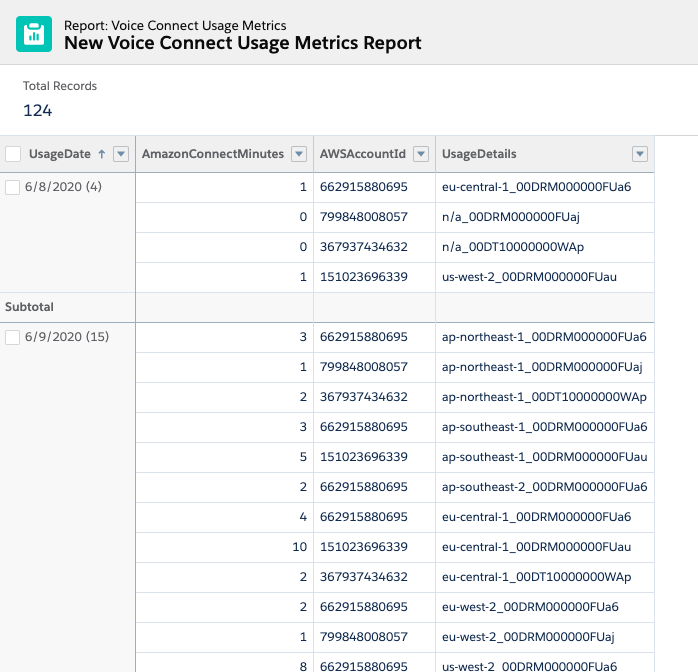
- Customers will also be able to view a detailed breakdown of usage for all the associates with this paying org in Custom Reports
- From Setup, enter Report Types in the Quick Find box, then select Report Types.
- Click New Custom Report Type.
- Select the Primary Object for your custom report type as VoiceAmazonConnectMetrics or VoiceAmazonLexMetrics.
- Complete the following fields as the following:
- Report Type Label: Voice Connect Usage Metrics
- Report Type Name: Voice_Connect_Usage_Metrics
- Description: Voice Connect Usage Metrics
- Store in Category: Other Reports
- Deployment Status: Deployed
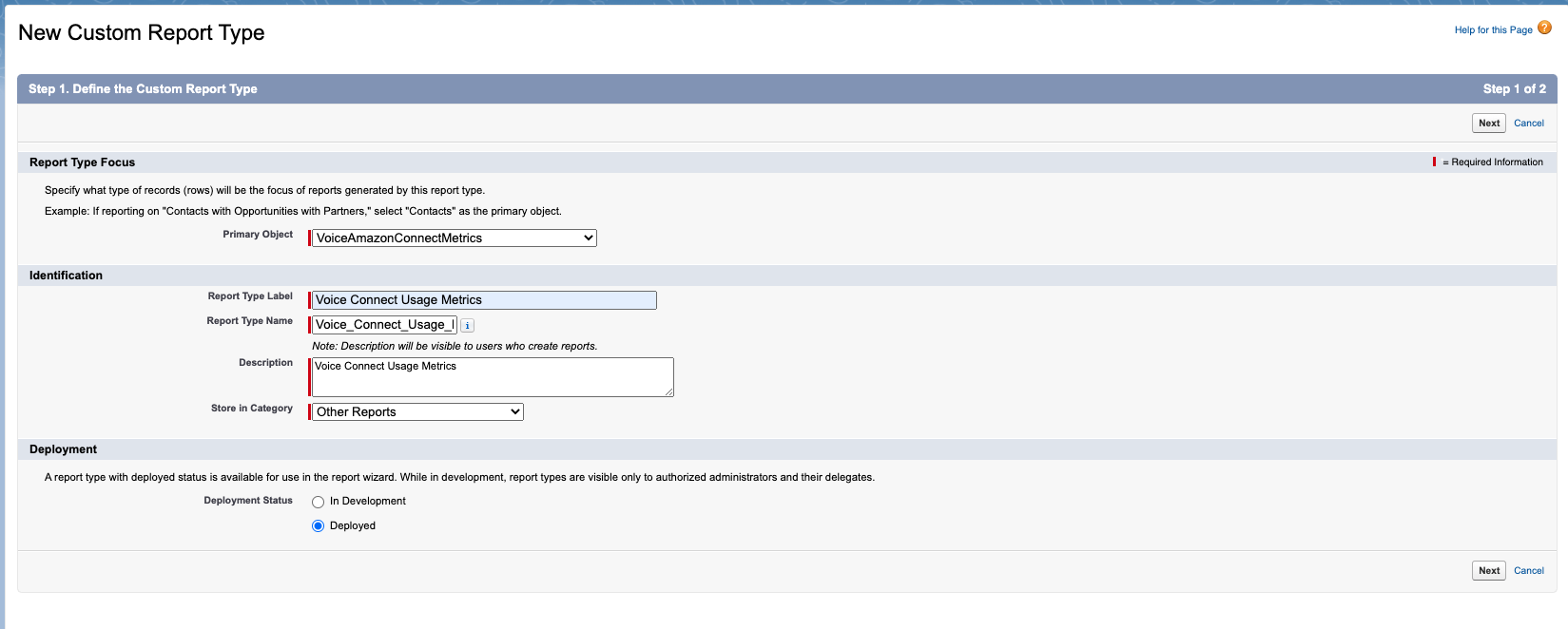
- Click Next & Save.
- From the Reports tab, click New Report.
- Select the report type for the report, and click Create.
- Customize your report, then save or run it.
Vidensartikelnummer
000353749
Løste denne artikel dit problem?
Giv os besked, så vi kan forbedre os!
