조직 선택
Marketing Cloud Connect V2 Retirement
게시 일자: Jan 3, 2025
상세 설명
Why was Marketing Cloud Connect v2 retired?
At Salesforce, Trust is our #1 value when serving our customers. Based on the need to provide proactive security patching on potential vulnerabilities, we can no longer support unmanaged packages where security patches cannot be pushed to the customer environments.
What was the replacement for Marketing Cloud Connect Version 2?
Marketing Cloud Connect Version 5 (MCCv5) is the replacement for MCC v2.
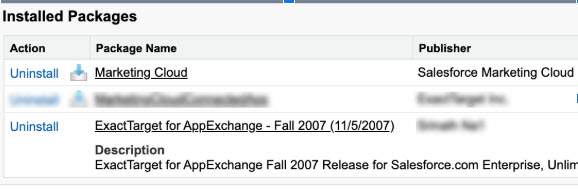
How did customers tell what version of the connector is installed within their Salesforce Sales/Service Cloud Org?
Customers can determine what version of the connector is currently installed in their Salesforce org by navigating to Setup>Installed Packages and search for a package named Exact Target for App Exchange - 2007 , which is the V2 Marketing Cloud Connector. The V5 of the Marketing Cloud Connector is named Marketing Cloud. The screenshot is below:
What action did customers need to take?
Review this on-demand webinar to understand the overview of items required to transition to Marketing Cloud Connector V5 and a demo walkthrough.
We recommend customers currently using the MCCv2 pursue one of the following options:
- Customers using Sales or Service Cloud Enterprise or Unlimited edition must download and upgrade to the latest version of the Marketing Cloud Connect product (MCCv5) and turn on the Subscriber Key option in Marketing Cloud if it is not already enabled. Subscriber Key is required for Marketing Cloud Connect. If it is not enabled in your Marketing Cloud account, complete a Subscriber Key Migration before proceeding with the connection process. Review the prerequisites to find out more or discuss enabling this with your Account Executive.
- Customers who currently have a Salesforce Professional Edition will need to upgrade their Salesforce Sales or Service Cloud edition to either Enterprise or Unlimited edition to access the currently supported MCCv5.
- Customers may use their Marketing Cloud user credentials and log directly into the Marketing Cloud user interface to perform their sending.
- For more detail on the differences between the two product versions, please visit the Marketing Cloud Connect Features page under Trailblazer Community Help.
What happened after the End-of-Life date if customers didn’t take action?
After March 31, 2021, customers using MCCv2 are no longer able to send emails through Marketing Cloud from their Salesforce CRM user interface. Additionally, help documentation, including the link to download the MCCv2 package, will be removed from our help & training site.
If you have more questions, open a case with Support via Salesforce Help. To view all current and past feature retirements, see Salesforce Feature Retirement.
To read about the Salesforce approach to retiring products and features, read our Feature Retirement Philosophy.
Knowledge 기사 번호
000391122
이 기사를 통해 문제를 해결했습니까?
개선을 위한 의견을 보내주세요.
