Välj en organisation
Salesforce Data Loader Shortcut Fails on Installation
Publiceringsdatum: Mar 13, 2025
Beskrivning
When installing Salesforce Data Loader, a popup will display when creating a shortcut, but can quit before it is created.
"Would you like to create a start menu shortcut? Yes/No
Would you like to create a desktop icon? Yes/No
Data Loader installation is quitting.
Press any key to continue . . .
Press any key to continue . . .
The Data Loader installation is successful however although no shortcut is created.
Lösning
For Dataloader version 61.0 or newer
After the installation is complete, manually copy the shortcut from the Windows Start menu and paste it to the desktop.
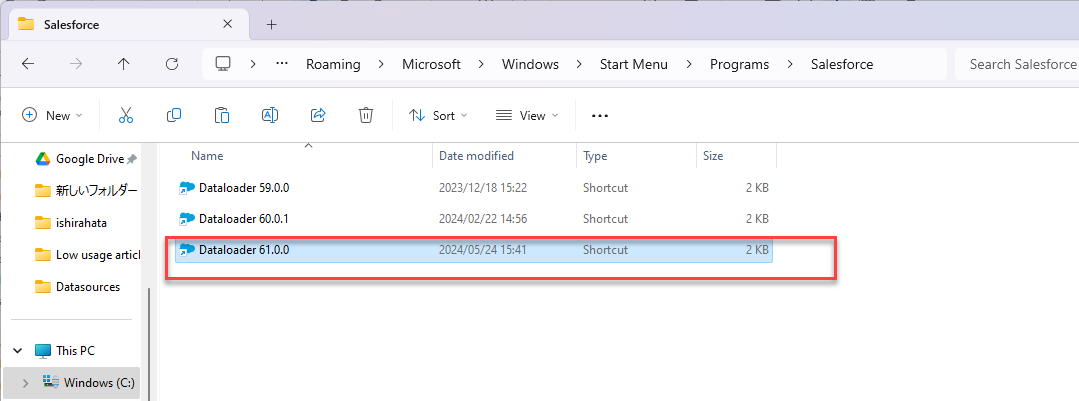
For Older Versions of Data Loader - Manually Create a Shortcut
Note: Upon completion of the Data Loader installation, the shortcut icon may be created on the desktop, but the shortcut may be corrupt and invalid. Follow the steps below to create a new shortcut file manually.
1. Go to the extracted dataloader_win.zip file > Data Loader.
2. Right-Click the dataloader.bat and Create Shortcut.
3. Select the new Dataloader - Shortcut and right-click.
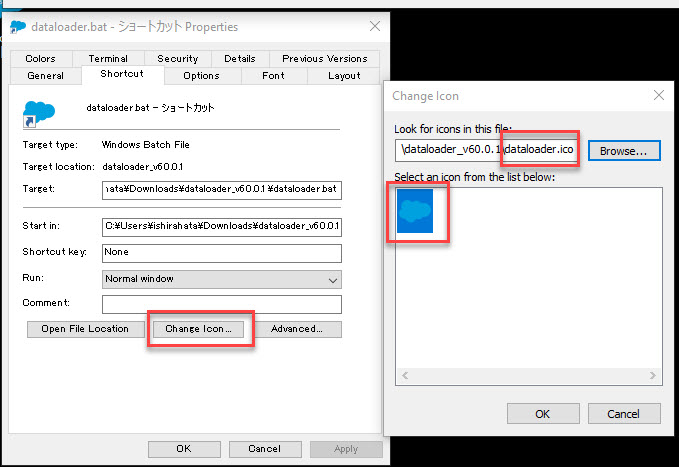
4. Under Shortcut, select Change Icon.
5. A message will popup stating, "Choose an icon from the list or specify a different file". Select OK.
6. Browse and look for the Dataloader folder from the extracted dataloader_win.zip.
7. Select the Dataloader icon, then Open and hit OK twice.
Choose the dataloader.ico file from the extracted zip file. This file contains the Dataloader icon information.
8. Rename the Shortcut.
9. Place it on your Desktop.
Knowledge-artikelnummer
000380116
Löste denna artikel ditt problem?
Berätta för oss vad vi kan förbättra!
