Seleccionar una organización
Use of different Marker modes in Maps
Fecha de publicación: Aug 25, 2026
Descripción
When you plot a Marker Layer on the map, all of the markers will display if there are 500 or fewer records. If there are 500 or more records in the Marker Layer, they will plot in Cluster mode. But you can change how these records display.
This article explains the different Marker modes available in Salesforce Maps and how to switch between them.
Solución
Selecting Different Marker Modes
- Select the Layers tab in the top navigation bar.
- Click the icon located to the left of the vertical ellipses (Options button).
- In the menu that appears, select the desired marker display mode.
Differences in Marker Modes
Markers
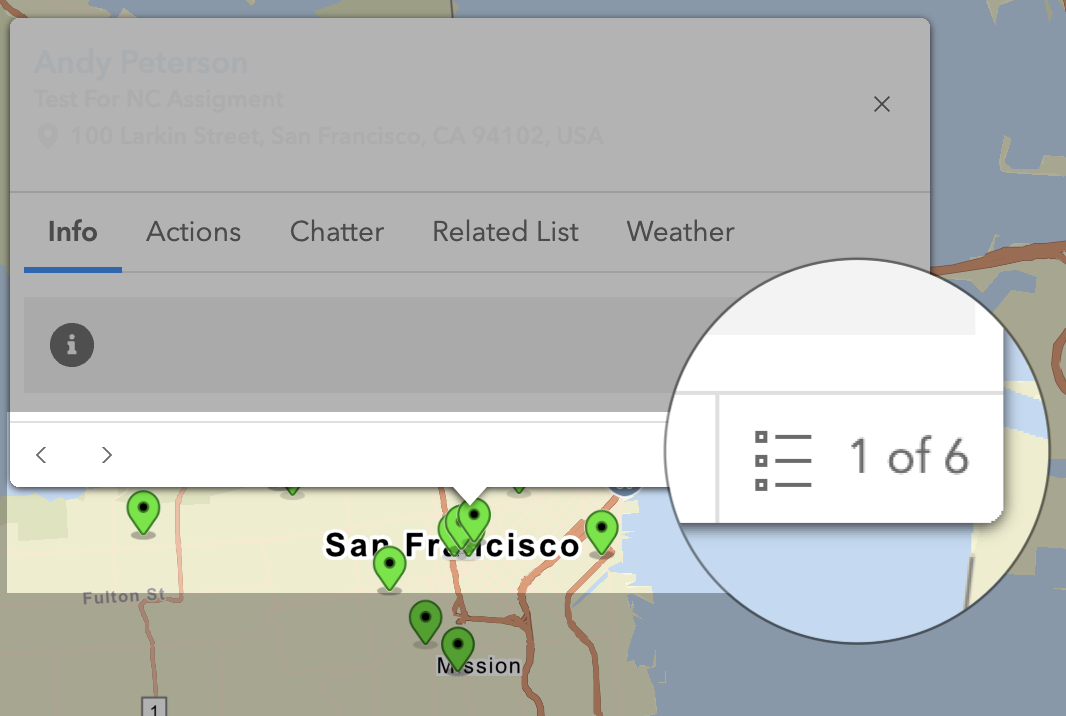
Markers are the standard view for records shown on the map. When markers are in close proximity, they will be stacked on top of each other. The number of stacked markers will be displayed in the bottom-right corner of the marker pop-up. You can navigate between the markers using the arrows on the bottom-left of the pop-up.
Clusters
This marker mode clusters all of the records together based on proximity and zoom level. Clicking on the cluster will display an aggregated tooltip telling the user the number of records that fall within it. If a Number or Currency field is used as a tooltip value in the Marker Layer, these will be aggregated as well. You can draw a boundary and zoom to the markers. This view is recommended when dealing with large sets of data.
Blue: 2-10 Records
Yellow: 11-100 Records
Red: 101-1000 Records
Pink: 1001+ Records
Heatmap
Heatmaps show record density. Depending on the data layer behind the heatmap, a user can tell where hotspots and gaps are located. Marketing and sales teams can use this feature to identify target markets or areas of expansion.
Scatter
This marker mode displays all of the records as a dot on the map. It ignores the clustering rule so each record returned by the Marker Layer will be displayed as a dot on the map.
Recursos adicionales
Número del artículo de conocimiento
000380324
¿Resolvió este artículo su problema?
¡Háganos saber cómo podemos mejorar!
