Seleccionar una organización
CPQ warning 'CPQIntegrationUserCert, Self-Signed, expires on mm/dd/yyyy. Warning: This certificate expires in xx day(s).'
Fecha de publicación: Oct 9, 2025
Descripción
Some Salesforce CPQ users may receive a certificate expiration email. The email may look like this example:
You have one or more certificates in your Salesforce org <organization-name> <organization-id> that will expire soon. Review the list below and visit Certificate and Key Management from Setup to make an update.
- CPQIntegrationUserCert, Self-Signed, expires on mm/dd/2020. Warning: This certificate will expire in xx day(s).
Solución
This email can be ignored. The certificate referenced in the email is no longer used by Salesforce CPQ, and does not introduce issues when it expires.
If the admin instead would like to delete this certificate, follow these steps:
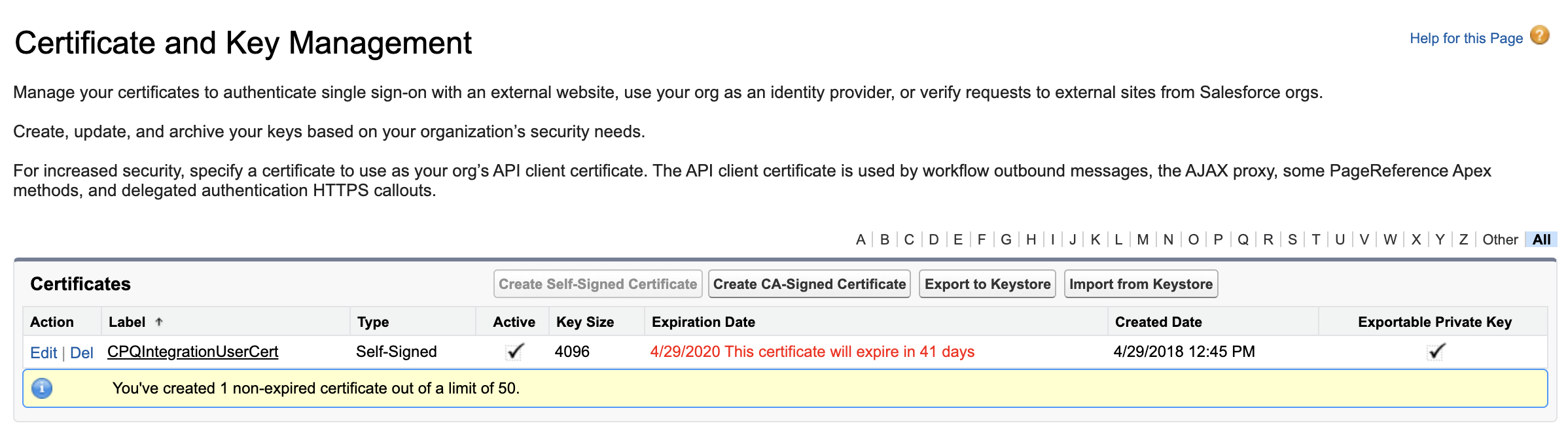
- From Setup, use the Quick Find by searching 'Certificate and Key Management'.
- Select 'Del' next to CPQIntegrationUserCert to remove the certificate.
See the screenshot below:
Note: If the certificate is used for Single Sign On, Connected Apps, or Identity Provider please refer to this article for more information.
Recursos adicionales
SEE ALSO
Número del artículo de conocimiento
000380543
¿Resolvió este artículo su problema?
¡Háganos saber cómo podemos mejorar!
