Seleziona un'organizzazione
Triggered Send Email REST API Email Send and Email Read Permissions
Data pubblicazione: Sep 11, 2024
Descrizione
If you're using the Triggered Send Email REST API, there might be issues where your API package is mis-configured for email sending. If your permissions aren't configured correctly, the REST API for email triggered sends will fail to function. You might see an API response of 403 - Insufficient Privileges error.
More information on Marketing Cloud API packages and permissions:
Risoluzione
If you are experiencing this error, please confirm and modify your API package permissions as follows:
- Navigate to Marketing Cloud Setup.
- Under Platform Tools, expand Apps.
- Click on Installed Packages to access all of your installed packages.
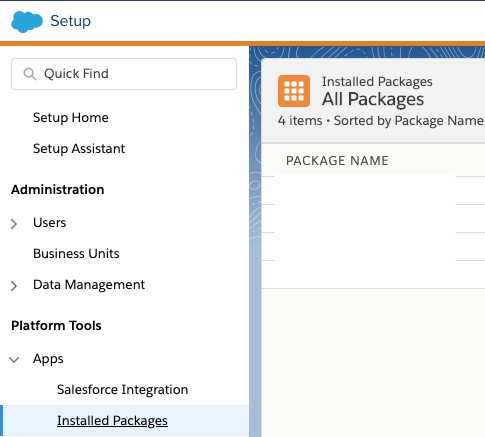
- Select the Package Name used for authenticating your REST API service with triggered sends.
- Under Scope (permissions), you'll find the Email permissions. Ensure that Email Send and Email Read are both selected so your API service can send and verify messages using the triggered send REST API.
- If the Email Send and Email Read permissions aren't selected, click Edit and select Email Read and Send.
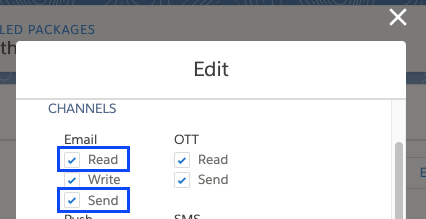
- Click Save and you are all set!
Follow this link for more information on Marketing Cloud API package configuration.
Numero articolo Knowledge
000380813
Questo articolo ha risolto il problema?
Facci sapere, così possiamo migliorare!
