Valitse organisaatio
Salesforce Error 'INVALID_OR_NULL_FOR_RESTRICTED_PICKLIST' Updating Picklist Field With Data Import Wizard
Julkaisupäivä: May 23, 2026
Kuvaus
Upon importing through Data Import Wizard, users may encounter an error when updating their picklist fields:
INVALID_OR_NULL_FOR_RESTRICTED_PICKLIST
Users may encounter this error when 'Restrict picklist to the values defined in the value set' is enabled in the picklist field's setup or the value being inserted into the field is not available in the object's record type.
See Create a Custom Picklist Field for picklist setup and Edit Picklists for Record Types and Business Processes for more details on how to add available values to record types.
Ratkaisu
Restrict picklist to the values defined in the value set
The following steps explain how to resolve the INVALID_OR_NULL_FOR_RESTRICTED_PICKLIST error in Salesforce's Data Import Wizard. This error occurs when a picklist value being imported is either not part of the defined value set or not available for the record type being updated
Make sure the picklist values used are the API names and not the picklist value label.
To add values to the 'visible values' column
1. Go to Setup by clicking the gear icon.
2. Click Object Manager.
3. Find and select the Object where your picklist is.
4. On the left side, click Record Types.
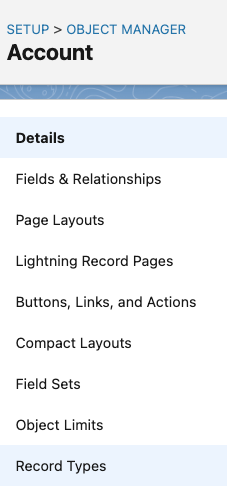
5. Under the Record Types page, click 'Edit' beside that picklist field that you are trying to update.
6. See if the value that you are trying to update is available on the 'Selected Values' column.
7. If not, choose the value from the 'Available Values' column and click the arrow pointing to the 'Visible Values' column to add it.
8. Click 'Save' to apply the changes.
Lisäresurssit
Picklists: Values VS API Names
Resolving data deployment errors: INVALID_OR_NULL_FOR_RESTRICTED_PICKLIST
Error 'bad value for restricted picklist field' appears when a record is created
Knowledge-artikkelin numero
000380951
Ratkaisiko tämä artikkeli ongelmasi?
Anna palautetta, jotta voimme kehittyä!
