Organisation auswählen
How to Add the Campaign Related List to the Account Page in Salesforce Lightning
Veröffentlichungsdatum: Apr 30, 2026
Beschreibung
Lösung
This functionality is only available in the Lightning Experience user interface.
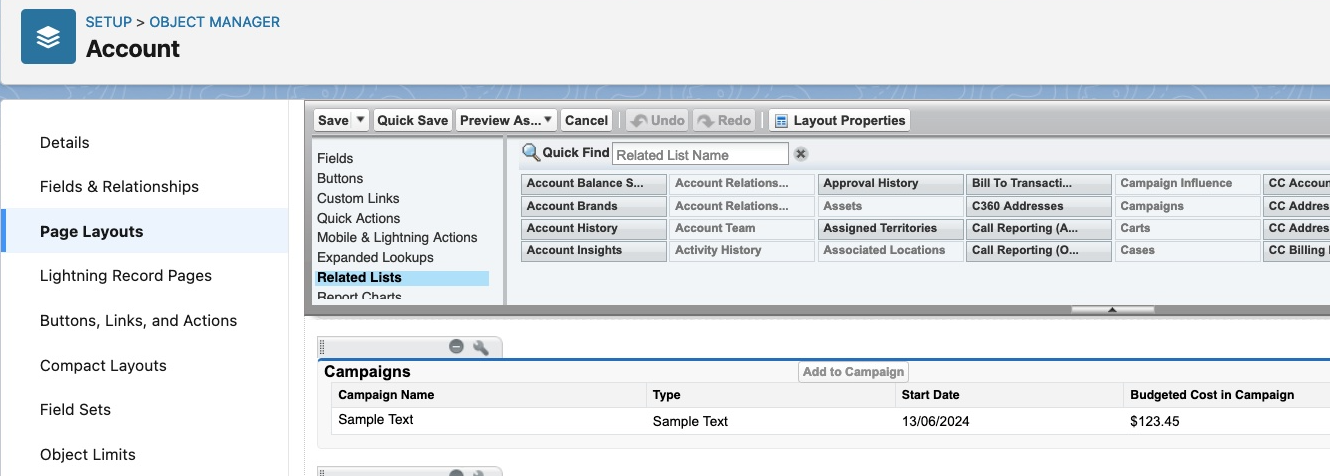
To add Campaigns related list to Account, please follow below click path:
Setup | Object Manager | Account | Page Layouts | Look for Campaigns under the related lists part and then drag it | Save the page layout.
To add Accounts related list to Campaign, please follow below click path:
Setup | Object Manager | Campaign | Page Layouts | Look for Accounts under the related lists part and then drag it | Save the page layout.
Zusätzliche Ressourcen
SEE ALSO:
Customize Related Lists
Nummer des Knowledge-Artikels
000381050
Konnten Sie Ihr Problem mithilfe dieses Artikels lösen?
Geben Sie uns Feedback, damit wir uns verbessern können.
