Velg en organisasjon
How to Add the Campaign Related List to the Account Page in Salesforce Lightning
Publiseringsdato: Apr 30, 2026
Beskrivelse
Løsning
This functionality is only available in the Lightning Experience user interface.
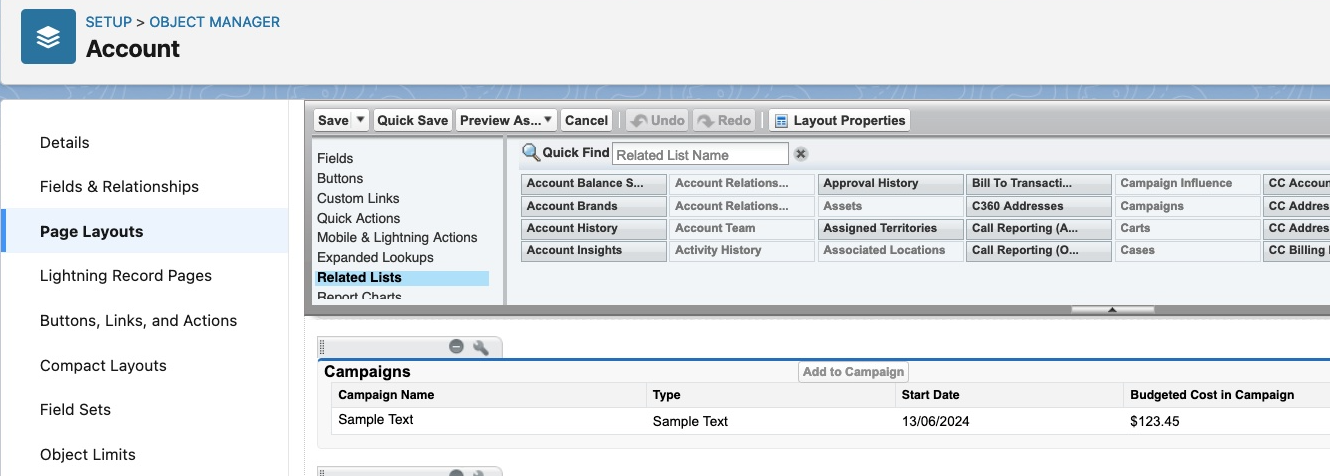
To add Campaigns related list to Account, please follow below click path:
Setup | Object Manager | Account | Page Layouts | Look for Campaigns under the related lists part and then drag it | Save the page layout.
To add Accounts related list to Campaign, please follow below click path:
Setup | Object Manager | Campaign | Page Layouts | Look for Accounts under the related lists part and then drag it | Save the page layout.
Flere ressurser
SEE ALSO:
Customize Related Lists
Knowledge-artikkelnummer
000381050
Hjalp denne artikkelen med å løse problemet ditt?
La oss få vite det slik at vi kan forbedre!
