조직 선택
Experience Cloud Site Users Cannot See Case Email Feed Items on Their Cases
게시 일자: May 21, 2026
상세 설명
솔루션
This behavior would indicate that the "Experience Site Case Feed" is not currently enabled in Support Settings. There are two steps to resolve the described issue.
- Update the Support Settings:
- Access Setup.
- Go to Support Settings.
- Click Edit.
- Select the check box for Enable Case Feeds in Experience Cloud Sites.
- Click Save.
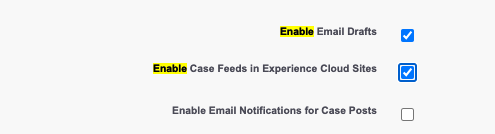
Note: If the option "Enable Case Feeds in Experience Cloud Sites" is not visible in Support Settings, navigate to Setup > Chatter Settings. Ensure that "Enable Actions in the Publisher" is enabled. If not, turn this on and check Support Settings again. The option "Enable Case Feeds in Experience Cloud Sites" should now be visible.
ii. Toggle the "Is Externally Visible" flag
- Navigate to one of the affected email messages.
- Toggle Is Externally Visible from True to False and Save.
- Once the save is complete, edit the field and switch back to True.
The email message feed item should now be visible to the Site User when accessing the parent Case record.
추가 자원
Activate Your Experience Cloud Site
AIAUDIT2026
Knowledge 기사 번호
000381098
이 기사를 통해 문제를 해결했습니까?
개선을 위한 의견을 보내주세요.
