Select An Org
Delete a Lightning Email Template in Salesforce
Publish Date: Oct 21, 2024
Description
This article explains the steps for deleting a Lightning email template in Salesforce if you have the correct permissions.
Resolution
Note: The steps given in this article apply only to Lightning Experience email templates. Before you delete any template, please ensure that you do not need the template any more and if you might, then make sure to save the information in the email template as a backup.
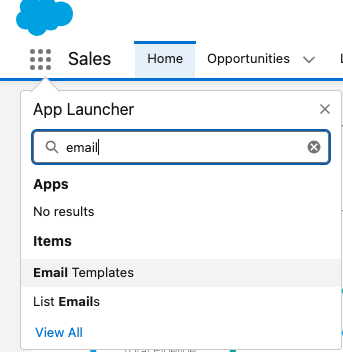
- In your Salesforce organization, click on the App Launcher icon.
- In the pop-up search box, enter email template and select Email Templates.
- Click on the name of the template that you would like to delete.
- In the top, right corner of the template selected, click on Delete.
- Click Delete on the warning message to confirm deletion.
Additional Resources
Considerations for Using Public and Private Email Templates in Lightning Experience
Manage Public and Private Email Templates in Lightning Experience
Trailblazer Community - Mass Deleting Email Templates
Knowledge Article Number
000381206
Did this article solve your issue?
Let us know so we can improve!
