[地図上に描画] ツールを使用するには、図形レイヤービルダーに移動し、国と適切な図形種別を選択することから始めます。[地図上に描画] ボタンを選択して描画を開始します。
Salesforce Maps によってサイドバーに図形種別が追加されます。
この時点で、テリトリーを選択に追加する、または選択から削除するためのオプションがいくつかあります。[図形の選択] 画面で任意の図形をクリックして、追加/削除できます。
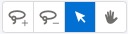
[図形の選択] リストに加えて、画面の右上にある 4 つの図形レイヤーツールを使用して選択を変更できます。
図形を追加: このツールを使用して、選択に図形を追加します。

図形を削除: このツールを使用して、選択から図形を削除します。
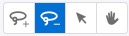
図形の切り替え: このツールを使用して、個々の図形のオンとオフを切り替えます。このツールを選択し、地図上の個々の図形を選択して、現在の選択に追加したり削除したりします。
デフォルトの地図カーソル: 図形を切り替えるときに、デフォルトの地図カーソルを選択して地図をパンできます。
000381351

We use three kinds of cookies on our websites: required, functional, and advertising. You can choose whether functional and advertising cookies apply. Click on the different cookie categories to find out more about each category and to change the default settings.
Privacy Statement
Required cookies are necessary for basic website functionality. Some examples include: session cookies needed to transmit the website, authentication cookies, and security cookies.
Functional cookies enhance functions, performance, and services on the website. Some examples include: cookies used to analyze site traffic, cookies used for market research, and cookies used to display advertising that is not directed to a particular individual.
Advertising cookies track activity across websites in order to understand a viewer’s interests, and direct them specific marketing. Some examples include: cookies used for remarketing, or interest-based advertising.