Seleziona un'organizzazione
Salesforce Maps Nearby Maps FAQ
Data pubblicazione: May 11, 2026
Descrizione
Nearby Maps is a Lightning Component that provides a quick and simple contextual map of Salesforce data. This article provides answers to frequently asked questions about the Nearby Maps features.
Risoluzione
1. What are the Nearby prerequisites?
- Salesforce Maps licenses assigned. In order to view the Nearby Maps on the record pages, the logged in user must have the Salesforce Maps licenses assigned
- Objects with Address Type field (address or geolocation).
- Records must be geocoded.
- Service Cloud Licenses (if you plan to use Nearby in Console).
2. Where can I use Nearby?
- Think of Nearby as a component that you can plug-in and reuse in many places throughout Salesforce: Classic page layouts, Lightning page layouts, Service Console, Salesforce Communities, public-facing websites, Visualforce pages.
3. What’s the difference between Nearby and the regular Salesforce Maps Map?
- Nearby Maps allow for a quick, simple, contextual, relevant, or nearby view of data on a record page. Nearby is great for users who need a visual of data without navigating the full Salesforce Maps map. Example: You’re a support rep at a utilities company. A customer calls with a power outage. You record the case. Nearby shows you this customer’s address, and a quick snapshot of nearby cases. Looks like there’s a bigger problem! Nearby shows a bunch of other cases reported in the area. You share this info with the customer and offer assurance.
- The regular Salesforce Maps map has more robust visuals and plotting options and allows for detailed marker layers, enhanced filtering, location analysis, shapes, and routing in addition to other features.
4. Does Nearby work in Mobile?
- Today, Nearby is not intended for use in Mobile.
5. What are Nearby's limitations?
- Nearby is optimized to show up to 50 markers and 3 tooltips for each marker.
- You can’t change map types (satellite, terrain, roads).
- Markers do not split apart when on top of each other.
- Nearby does not support multi-select picklists.
- Nearby does not support date or checkbox fields.
- An error will be presented and no pins will show on the Nearby Map if there are no nearby records that fit the filter criteria
6. I get unexpected results with sorting in Ascending / Descending order. Why?
- When sorting a Nearby by Ascending / Descending, and selecting a limit of 10 (for example), you may not see 10 markers on the map. This happens because some records may not be geocoded. Remember, Nearby only shows geocoded records. To ensure you see all 10 markers, add filter to make sure latitude and longitude are not blank.
7. I don't always see the closest records. What's going on?
- The process of fetching and displaying records in Near By Maps uses two steps:
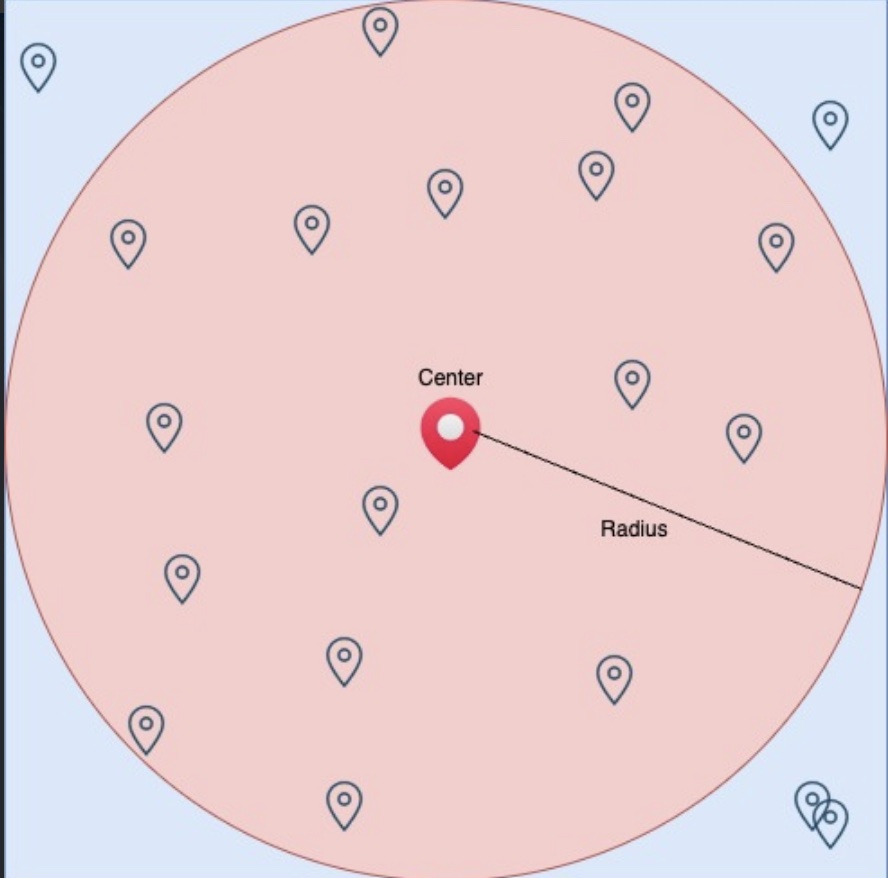
First, Nearby creates a bounding box that encapsulates a circle with a radius of 'x' miles (where 'x' is the radius set in NB Maps). We then run a SOQL query based on the filters defined in NB Maps, limiting the records to the number of markers set in the NB Map configuration and within the bounding box.
Next, we apply a second layer of filtering to include only the records that fall within the circle of 'x' miles radius. When displaying the records on NB Maps, we show only those that fall within the circle. Therefore, any records fetched by the query that fall within the rectangle but outside the circle are ignored. The diagram below illustrates this process: markers within the circle (shaded in pink) are displayed, while markers within the bounding box (shaded in blue) but outside the circle are ignored.
In some cases, when a large number of markers are returned by the SOQL query, there may be records that fall within the square but not the circle. This can lead to discrepancies where some markers are missed or no markers are displayed on NB Maps. To avoid this, we recommend adding additional filters to your NB Maps to limit the number of markers returned. Alternatively, you can add a sort order in the NB Map configuration to ensure the records returned by the SOQL query are ordered by the sort field.
8. Do Nearby Maps support decimal values for the radius field?
- Yes, you can enter "2.5 miles" as opposed to being limited to just 2 or 3 miles. However, the Radius value can only be between 1 to 3000.
Risorse aggiuntive
Showing Nearby Maps in Salesforce Records and on Sites
Numero articolo Knowledge
000381376
Questo articolo ha risolto il problema?
Facci sapere, così possiamo migliorare!
