組織を選択
データローダーで日付の範囲を指定してエクスポートする手順
公開日: Jul 2, 2026
説明
データローダーで日付の範囲を指定してエクスポートする手順を案内します。
解決策
データローダーを使用して特定の日付範囲内のデータをエクスポートする方法を説明します。日付型項目と日付時間型項目のクエリ追加手順を詳しく解説します。
■日付型項目の場合
たとえば、日付型項目で 2017 年 9 月 1 日から 2017 年 9 月 30 日までを指定する場合、次のように指定します。
日付型項目 greater than or equals 2017-09-01
[Add condition] ボタンを押下します。
日付型項目 less than or equals 2017-09-30
[Add condition] ボタンを押下します。
[Add condition] ボタンを押下します。
日付型項目 less than or equals 2017-09-30
[Add condition] ボタンを押下します。
上記操作で条件を追加すると、以下のようなクエリが生成されます。
Select 抽出項目 FROM オブジェクト WHERE 日付型項目 >= 2017-09-01 AND 日付型項目 <= 2017-09-30
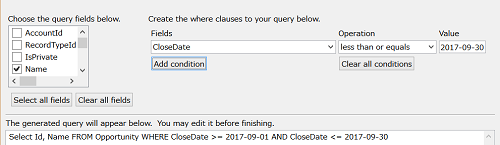
以下は商談の [完了予定日]: CloseDate を使用して商談の ID、Name をエクスポートする場合のサンプル画面です。
※商談の [完了予定日]: CloseDate
■日付時間型項目の場合
日付時間型の場合には以下のように指定します。
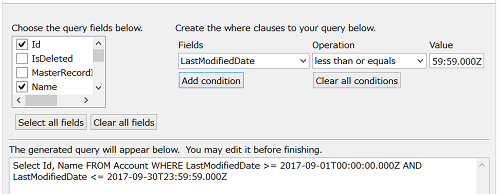
※最終更新日や作成日は、日付時間型になります。
日付時間型項目 greater than or equals 2017-09-01T00:00:00.000Z
[Add condition] ボタンを押下します。
日付時間型項目 less than or equals 2017-09-30T23:59:59.000Z
[Add condition] ボタンを押下します。
[Add condition] ボタンを押下します。
日付時間型項目 less than or equals 2017-09-30T23:59:59.000Z
[Add condition] ボタンを押下します。
以下は最終更新日を使用して取引先の ID、Name をエクスポートする場合のサンプル画面です。
なお、「今日」のような相対値で指定する場合、レポートを作成します。
関連記事:
相対日付検索条件の参照
値によるレポートの絞り込み
リストビューとレポートで使用する相対日付
レポートのエクスポート
ナレッジ記事番号
000381609
この記事で問題は解決されましたか?
ご意見をお待ちしております。
