Valitse organisaatio
Proactive Monitoring: Overview
Julkaisupäivä: Apr 3, 2026
Kuvaus

• Smart Alerts • Proactive Monitoring on Salesforce Help • Feedback Discover what Proactive Monitoring is and how it offers 24/7 monitoring to help customers manage the health of their Salesforce implementation. Check out the cloud-specific alert pages linked below to learn more about individual Proactive Monitoring alert types. Visit the Proactive Monitoring on Salesforce Help knowledge article for more details about the portal experience. Proactive Monitoring Overview Introduction Proactive Monitoring helps predict and prevent issues with 24/7 monitoring and early warnings, allowing customers to keep their business operations running smoothly. It is a feature of the Signature Success Plan, with coverage for Sales, Service, Agentforce, Experience Cloud, Platform, B2C Commerce Cloud, Marketing Cloud Account Engagement, Marketing Cloud Engagement, Marketing Cloud Intelligence, and Tableau. Proactive Monitoring tracks 50+ key implementation health metrics at the tenant level and provides early detection of issues like inefficiencies, application performance degradation, or errors with near-real-time notifications. When generating alerts, Proactive Monitoring provides tailored diagnostic detail, makes prescriptive recommendations, and automatically creates support cases to connect customers with Proactive Monitoring Engineers for assistance. Proactive Monitoring Engineers will analyze the root cause of the alert and provide you with the details. The team will also verify if there were any internal maintenance activities or issues mentioned in the trust post during the alert timeframe. In addition to its monitoring and detection tools, Proactive Monitoring is supplemented with a services offering. Proactive Services Engineers work with customers to establish their monitoring plan and manage their alert configuration to ensure optimal monitoring coverage. Customers can also use the self-help feature to manage smart alerts through Proactive Monitoring on Help. When a Proactive Monitoring Smart Alert is fired, Monitoring Technical Engineers will support customers with their cases. With Proactive Monitoring, customers can:
Watch the Proactive Monitoring Overview video. Who to Contact About Proactive Monitoring If you are a Signature Success Plan customer and have questions about Proactive Monitoring, please contact your Customer Success Manager. Proactive Monitoring Smart Alerts With Proactive Monitoring Smart Alerts, customers can predict and diagnose issues. They will be notified of any potential performance and scale limitations that could impact their business-critical solutions. Earlier notification of critical issues via Proactive Monitoring Smart Alerts means support teams can quickly swing into action, solve problems faster, and remediate issues before they impact business. Cloud Coverage Proactive Monitoring is available for the following clouds. Learn more about each cloud’s alerts and corresponding definitions:
Smart Alert Content Proactive Monitoring Smart Alerts contain the following content, which will vary by alert level:
 Smart Alert Types and Case Creation For most Proactive Monitoring metrics, an alert is fired when the given metric breaches and holds above a specified threshold for a specific duration for a given tenant. These thresholds can be:
A support case is automatically generated when a Proactive Monitoring metric triggers a Critical level or Exhaust level alert. Salesforce Support will then review and troubleshoot the issue. While the case remains open, no new cases will be created for the given metric until the existing case is closed. For Warning level alerts, a case is not automatically generated, but users can create a support case from Salesforce Help. Smart Alert Configuration Proactive Monitoring Smart Alerts have logic configured at the tenant level to cater to a customer’s implementation needs by ensuring that alert coverage is optimized and noise is minimized. There are two methods for configuring the Smart Alerts. The Proactive Services Engineering team will work directly with a customer to review and adjust alert thresholds and duration values periodically or as needed, this can be initiated by contacting your CSM. Alternatively, Core Signature customers can now review and adjust the alert thresholds and duration values via ProM on Help. Visit "ProM on Help: Knowing when & how to modify your alert configurations" for more details. If a customer has a question or a request related to their Proactive Monitoring configuration, they should contact their Customer Success Manager. Proactive Monitoring on Salesforce Help The Proactive Monitoring tab on Salesforce Help provides customers with on-demand analysis of performance metric trends and a view into alert configuration. It is available to Signature Success Plan customers with Sales, Service, Experience Cloud, or Platform. With Proactive Monitoring on Salesforce Help, customers can:
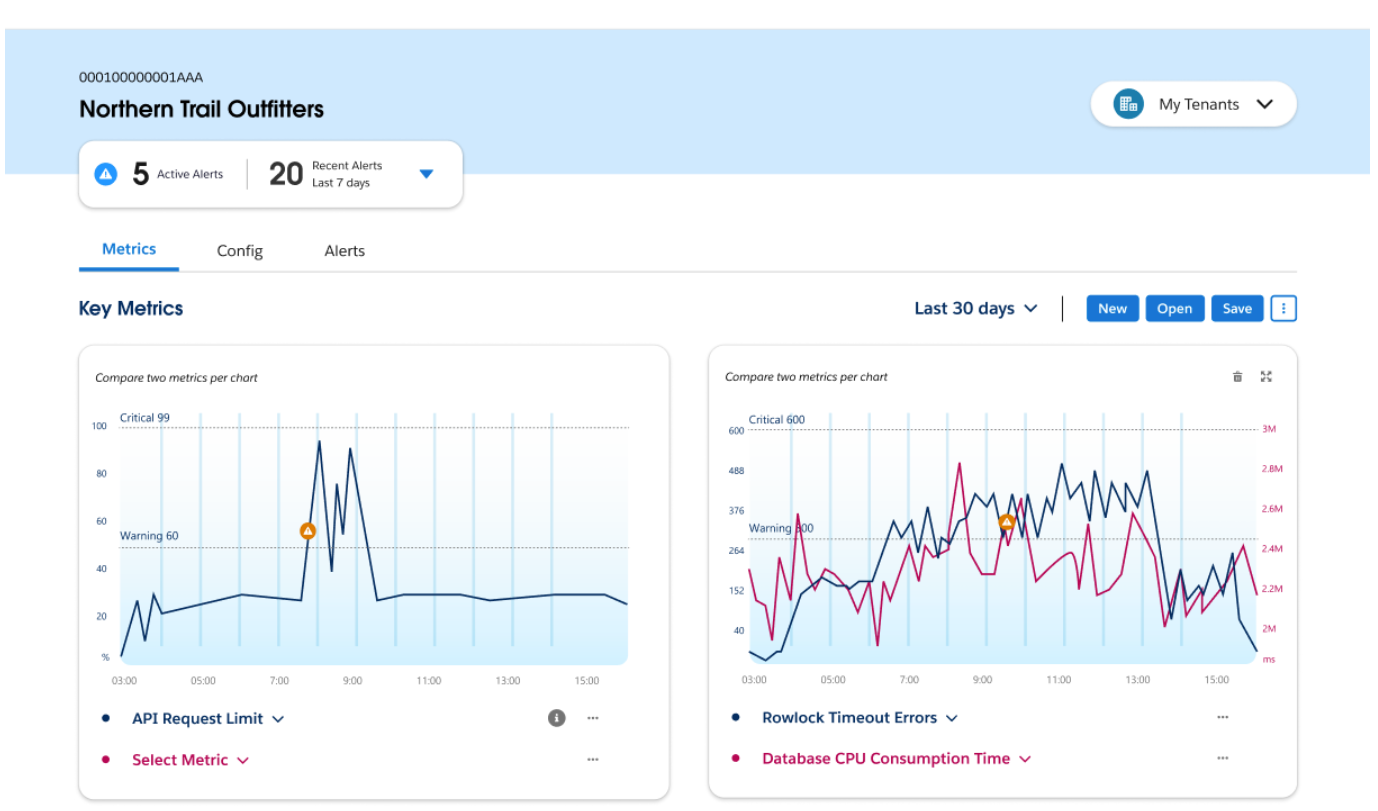 Access Proactive Monitoring on Salesforce Help. Visit the Proactive Monitoring on Salesforce Help knowledge article for a detailed walkthrough of the experience and FAQs. Watch the demo video to learn more about Proactive Monitoring on Help. Feedback Let us know what you think about Proactive Monitoring Smart Alerts and Proactive Monitoring on Salesforce Help. Launch the survey from the Proactive Monitoring on the Salesforce Help interface to share your thoughts and tell us what features you’d like to see in the future. |
Knowledge-artikkelin numero
000382042
Ratkaisiko tämä artikkeli ongelmasi?
Anna palautetta, jotta voimme kehittyä!
