組織を選択
Dependent Field Showing up on an Account Engagement Form Before Controlling Value is Selected
公開日: Sep 30, 2025
説明
解決策
Form Field Dependency Tag is Missing
The %%form-field-dependency-css%% tag is missing from the Form tab of the layout template. The %%form-field-dependency-css%% tag is found here:
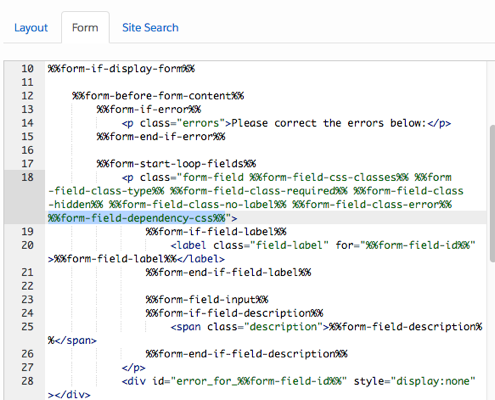
Head Tag Missing from Layout Template
When the layout template of the form is missing the <head></head> tags (in the 'Layout' tab'), a console error will show. You'll see the error 'Uncaught ReferenceError: pardot is not defined' in the developer console, which can be accessed by right-clicking on your form and selecting "Inspect' or "Inspect Element":
Add the <head></head> back into your layout template. The best way to accomplish this is to compare this layout template to a different one that is being used on another form.
ナレッジ記事番号
000382318
この記事で問題は解決されましたか?
ご意見をお待ちしております。
