組織を選択
Microsoft Office 365 SharePoint Online と連携させたい場合はどうすればよいですか?
公開日: Apr 2, 2025
説明
A. Files Connect 設定
B. 権限セット作成
C. 認証プロバイダ設定(仮)
D. Office 365 Application 登録
E. 認証プロバイダ編集
F. 外部データソース作成
G. 権限セット編集
H. 確認方法
B. 権限セット作成
C. 認証プロバイダ設定(仮)
D. Office 365 Application 登録
E. 認証プロバイダ編集
F. 外部データソース作成
G. 権限セット編集
H. 確認方法
解決策
※本作業はすべて “システム管理者” にて作業を行ってください。
A. Files Connect 設定
1. [設定] | [機能設定] | [Salesforce Files] の順にクリックします。
2. [Files Connect の有効化] をチェックし、保存をクリックします。[ファイル共有] は [参照] を選択します。
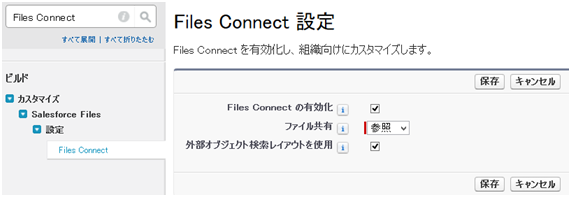
2. [Files Connect の有効化] をチェックし、保存をクリックします。[ファイル共有] は [参照] を選択します。
B. 権限セット作成
1. [設定] | [ユーザ] | [権限セット] | [新規] ボタンをクリックします。
2. 権限セットの情報を任意に入力し、[保存] ボタンをクリックします。
3. [システム権限] のリンクをクリックします。
4. [編集] ボタンをクリックします。
5. [Files Connect (クラウド)] をチェックし、[保存] をクリックします。

6. [割り当ての管理]ボタン、[割り当てを追加]ボタンを順にクリックし、設定しているシステム管理者を作成した権限セットに追加します。
2. 権限セットの情報を任意に入力し、[保存] ボタンをクリックします。
3. [システム権限] のリンクをクリックします。
4. [編集] ボタンをクリックします。
5. [Files Connect (クラウド)] をチェックし、[保存] をクリックします。
6. [割り当ての管理]ボタン、[割り当てを追加]ボタンを順にクリックし、設定しているシステム管理者を作成した権限セットに追加します。
C. 認証プロバイダ設定(仮)
1. [設定] | [ID] | [認証プロバイダ] の順にクリックします。
2. [新規] ボタンをクリックします。
3. 認証プロバイダ設定を入力し、[保存] をクリックします。
2. [新規] ボタンをクリックします。
3. 認証プロバイダ設定を入力し、[保存] をクリックします。
- プロバイダタイプ:Microsoftアクセスコントロールサービス
- 名前:任意
- URL 接尾辞:任意
- コンシューマ鍵:後で変更するため、任意に入力
- コンシューマの秘密:後で変更するため、任意に入力
- 承認エンドポイント URL:後で変更するため、任意に入力
- トークンエンドポイント URL:後で変更するため、任意に入力
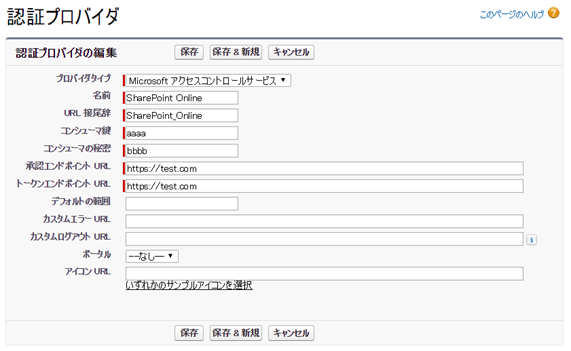
4. [Salesforce 設定] の [コールバックURL] をコピーします。SharePoint Online 側で利用します。

D. Office 365 Application 登録
- 本資料では、以下の SharePoint Online の URL(架空) かつ、サイトコレクションを対象とします。
- https://sfdcsupporttest.sharepoint.com/sites/test/
1. システム管理者として Microsoft 365 アカウントにログインし、次のいずれかの URL にアクセスします。
SharePoint Online
https://あなたの会社名.sharepoint.com/サイトコレクションパス/_layouts/15/appregnew.aspx
OneDrive for Business
https://あなたの会社名-my.sharepoint.com/_layouts/15/appregnew.aspx
2. アプリ情報を入力し、[作成] ボタンをクリックします。
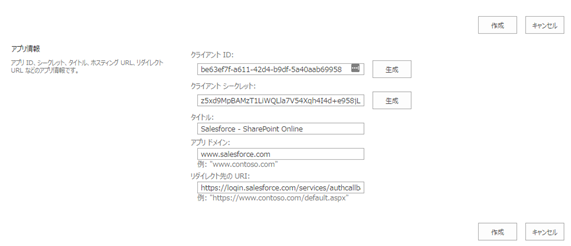
- クライアント ID:生成ボタンをクリックします(後で利用するため値をコピーします)
- クライアント シークレット::生成ボタンをクリックします(後で利用するため値をコピーします)
- タイトル:任意
- アプリドメイン: login.salesforce.com を入力します
- リダイレクト先の URI: 先のコールバック URL を入力します
3. アプリ ID が作成されます。[OK] をクリックします。

4. 次のいずれかの URL にアクセスします。
SharePoint Online
https://あなたの会社名.sharepoint.com/サイトコレクションパス/_layouts/15/appinv.aspx
OneDrive for Business
https://あなたの会社名-my.sharepoint.com/_layouts/15/appinv.aspx
5. アプリ ID に先ほどコピーしたクライアント ID を貼り付け、参照をクリックします。タイトル、アプリドメイン、リダイレクト先の URL が自動で補完されます。
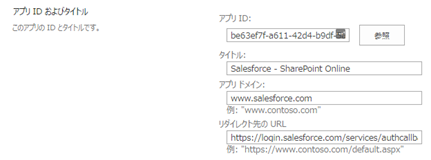
6. [アプリの権限要求 XML] に以下を入力し、[作成] ボタンをクリックします。
<AppPermissionRequests>
<AppPermissionRequest Scope="http://sharepoint/content/sitecollection" Right="Write"/>
</AppPermissionRequests>
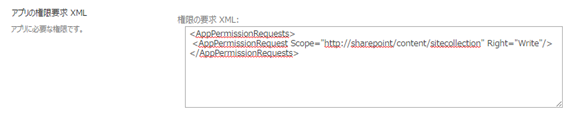
※Scope 内は以下のように指定することで、サイトコレクションやサイト単位で設定可能です。
http://sharepoint/content/sitecollection/web
- ユーザが 1 つのサイト (そのサブサイトは対象外) にアクセスできるようにする場合。
http://sharepoint/content/sitecollection
- ユーザが 1 つのサイトコレクション (すべてのサブサイトを含む) にアクセスできるようにする場合。
http://sharepoint/content/tenant
- ユーザがすべてのサイトコレクションにアクセスできるようにする場合。
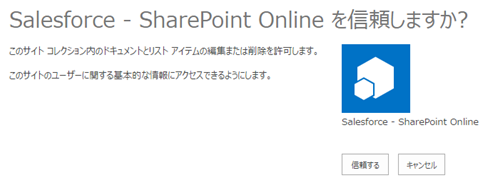
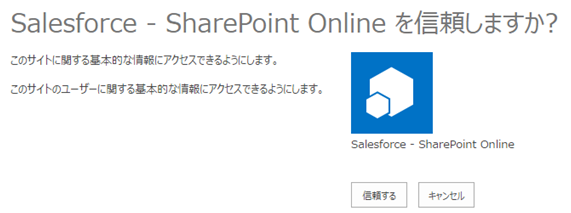
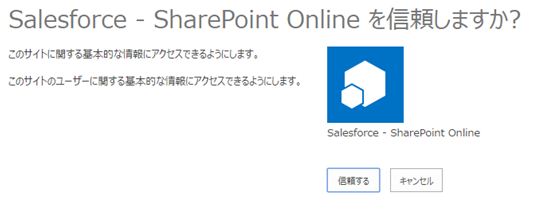
7. 「信頼しますか?」と確認が表示されたら、[信頼する] ボタンをクリックします。
E. 認証プロバイダ編集
1. [設定] | [ID] | [認証プロバイダ] へアクセスし、先に作成した認証プロバイダ名をクリックします。
2. [編集] ボタンクリックします。
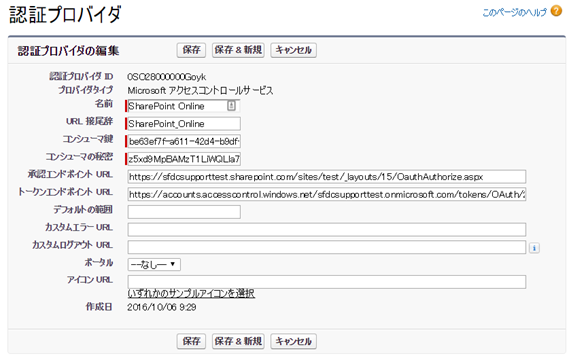
3. 先に作成した認証プロバイダを以下のように編集します。
2. [編集] ボタンクリックします。
3. 先に作成した認証プロバイダを以下のように編集します。
- コンシューマ鍵:先にコピーしたクライアントIDを貼り付けます
- コンシューマの秘密:先にコピーしたクライアントシークレットを貼り付けます
-
承認エンドポイント URL — Microsoft 365 の OAuthAuthorize.aspx ページの URL を入力します。URL 形式は次のとおりです。
SharePoint Online
https://あなたの会社名.sharepoint.com/サイトコレクションパス/_layouts/15/OauthAuthorize.aspxOneDrive for Business
https://あなたの会社名-my.sharepoint.com/_layouts/15/OauthAuthorize.aspx
-
トークンエンドポイント URL — 次の形式で URL を入力します。
SharePoint Online
https://accounts.accesscontrol.windows.net/あなたの会社名.onmicrosoft.com/tokens/OAuth/2?resource=00000003-0000-0ff1-ce00-000000000000/あなたの会社名.sharepoint.com@あなたの会社名.onmicrosoft.comOneDrive for Business
https://accounts.accesscontrol.windows.net/あなたの会社名.onmicrosoft.com/tokens/OAuth/2?resource=00000003-0000-0ff1-ce00-000000000000/あなたの会社名-my.sharepoint.com@あなたの会社名.onmicrosoft.com
F. 外部データソース作成
1. [設定] | [インテグレーション] [外部データソース] の順にクリックします。
2. [新規外部データソース] をクリックします。
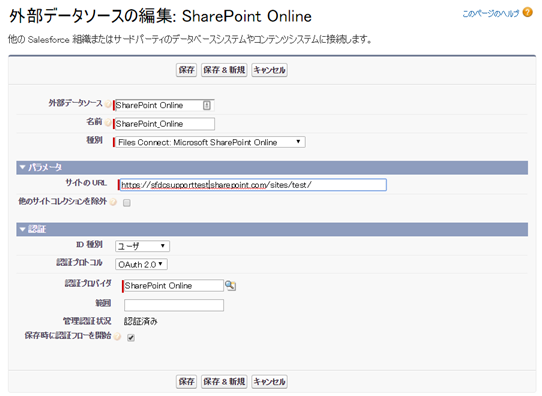
3. 以下の要領で設定し、[保存] をクリック
2. [新規外部データソース] をクリックします。
3. 以下の要領で設定し、[保存] をクリック
- 外部データソース:任意
- 名前:任意
- 種別:Files Connect : Microsoft SharePoint Online
- サイトのURL:利用するサイトコレクションのURLを入力
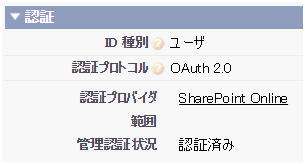
- ID種別:ユーザ
- 認証プロトコル:OAuth 2.0
- 認証プロバイダ:先に作成した認証プロバイダ
- 保存時に認証フローを開始:チェック
4. [信頼するボタン] をクリックします。
5. [管理認証状況] が [認証済み] に変わります。
G. 権限セット編集
1. [設定] | [ユーザ] | [権限セット] へアクセスし、作成した権限セットをクリックします。
2. [外部データソースアクセス] のリンクをクリック
3. [編集] ボタンをクリック
4. [有効な外部データソース] に先に作成した外部データソースを追加し、[保存] ボタンをクリックします。
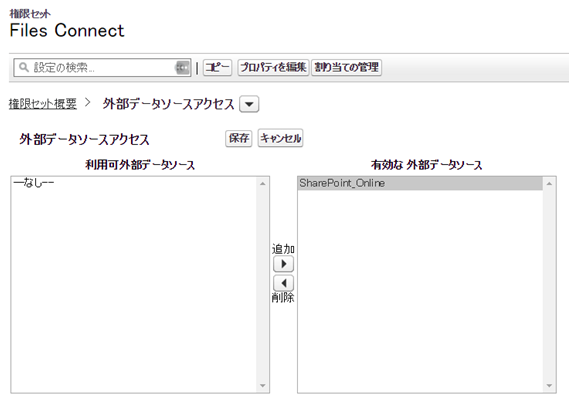
2. [外部データソースアクセス] のリンクをクリック
3. [編集] ボタンをクリック
4. [有効な外部データソース] に先に作成した外部データソースを追加し、[保存] ボタンをクリックします。
以上で、SharePoint Online と Files Connect の連携が完了します。連携を利用させるユーザを本権限セットに適宜割り当てを行ってください。
H. 確認方法
1. [ファイル] タブをクリック
2. 外部ファイルに、先に作成した SharePoint Online の外部ファイルが表示されます。
2. 外部ファイルに、先に作成した SharePoint Online の外部ファイルが表示されます。
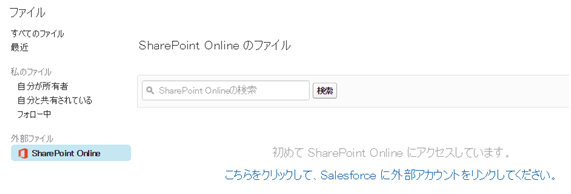
3. 初回アクセス時は「こちらをクリックして、Salesforce に外部アカウントをリンクしてください。」をクリックします。
4. SharePoint Online 側で [信頼する] ボタンをクリックします。
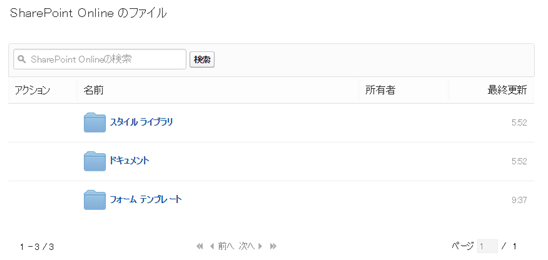
5. Salesforce 上で、SharePoint Online のサイトコレクションのドキュメントライブラリが参照できます。
ナレッジ記事番号
000382325
この記事で問題は解決されましたか?
ご意見をお待ちしております。
