組織を選択
Marketing Cloud Engagement - インポートファイルが 0 件の場合の挙動について
公開日: Feb 27, 2026
説明
Marketing Cloud Engagement では、データエクステンションに空白 (0 件) のファイルをインポートする場合、デフォルトではインポートエラーを返します。インポート時にエラーを発生させることなく空白ファイルを取り込む場合は、インポートアクティビティの [詳細ファイルオプション] にある [空のファイルの動作] オプションから設定できます。
ヘルプページ: 外部ファイルをソースとして使用した大きなデータセットのインポートまたはコピー
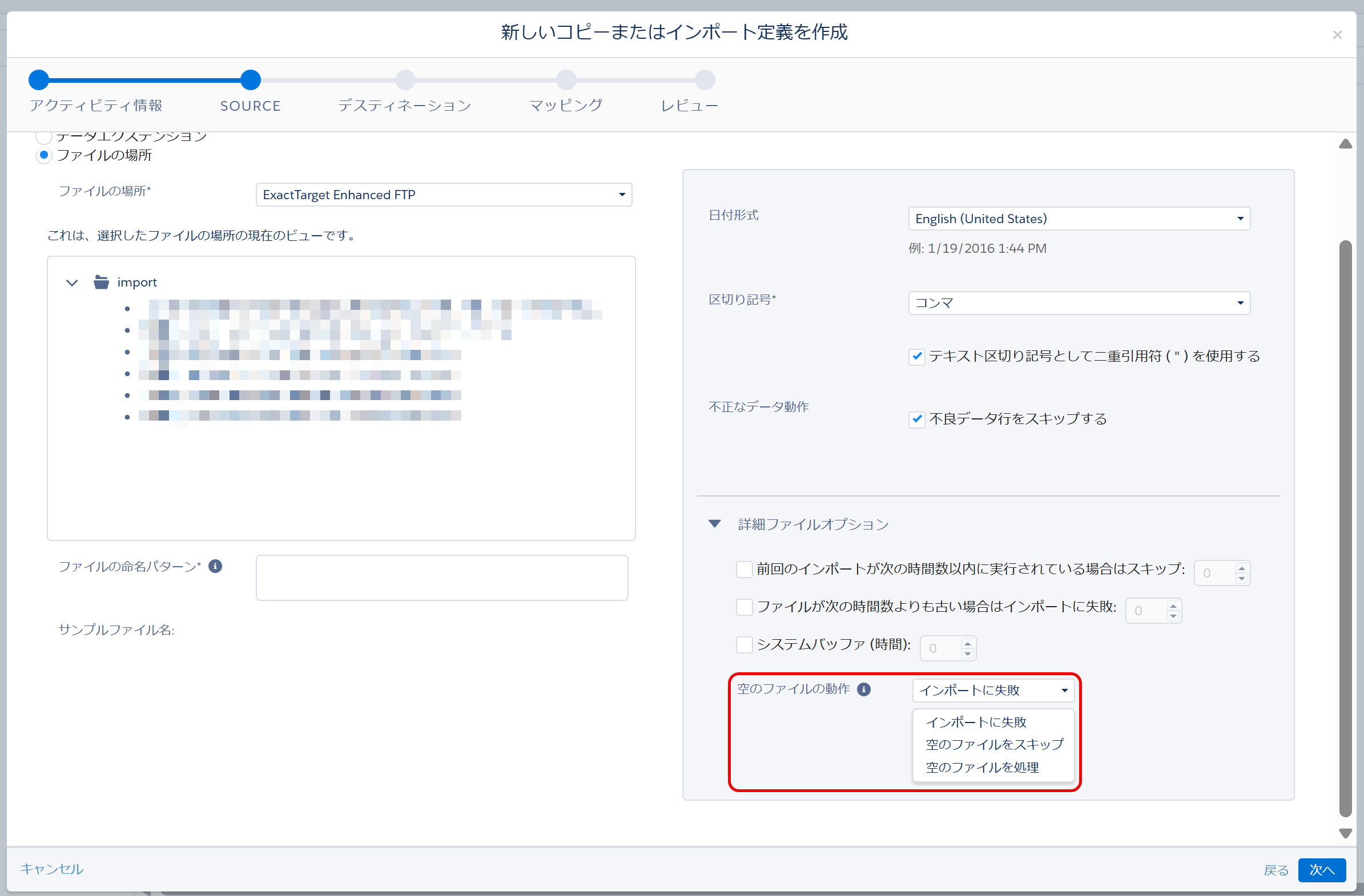
空のファイルの動作 オプションの挙動
| 空のファイルの動作 | 更新タイプ | 挙動 |
|---|---|---|
| インポートに失敗 | 追加のみ (Add Only) 変更のみ (Update Only) 追加と変更 (Add and Update) 上書き (OverWrite) | ソースデータが空白 (0 件) の場合、エラーを発生させます |
| 空のファイルをスキップ | 追加のみ (Add Only) 変更のみ (Update Only) 追加と変更 (Add and Update) 上書き (OverWrite) | ソースデータが空白 (0 件) の場合、アクティビティの実行は成功しますが、インポート処理は実行されません |
| 空のファイルを処理 | 上書き (OverWrite) | ソースデータが空白 (0 件) の場合、データの更新 (既存レコードの削除) が行われ、ターゲットのデータエクステンションのレコードを 0 件にします |
| 追加のみ (Add Only) 変更のみ (Update Only) 追加と変更 (Add and Update) | ソースデータが空白 (0 件) の場合、ターゲットのデータエクステンションに対してデータの更新を行わず、インポートを完了します |
本オプションはサポートへの設定依頼が必須となっておりましたが、 Spring ’24 Release よりお客様側で設定可能なオプションとして提供開始しました。
リリースノート: Automation Studio での空白ファイルのインポートの設定
*以前、サポートに依頼をいただき空白(0件)のファイル取り込む機能を有効にしているビジネスユニットでも、[Blank File Behavior] オプションから、インポートの際に空白のファイルを取り込む挙動を変更することができます。
ナレッジ記事番号
000382393
この記事で問題は解決されましたか?
ご意見をお待ちしております。