Выбрать организацию
Create Salesforce Tasks That Recurs Quarterly
Дата публикации: Aug 13, 2025
Описание
When creating a Recurring Task in Salesforce, you are provided the option to select a daily, weekly, monthly, or yearly frequency.
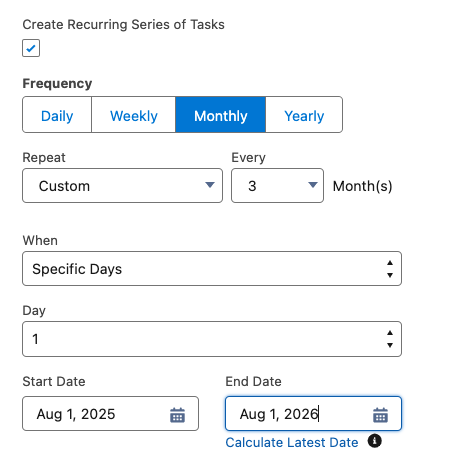
Although a quarterly frequency option is not available, it is still possible to set a task to occur quarterly by selecting monthly and setting it to occur every 3 months.
Решение
In order to adjust the Task frequency, the Task page layout must be updated and the setting selected to Enable Creation of Recurring Tasks before following the steps below.
To set a Task to reoccur quarterly
- From the Tasks tab, select the drop-down arrow and click New Task.
- Enter the Task general information.
- Below Due Date, check the box Create Recurring Series of Tasks.
- Choose the frequency Monthly.
- Choose every 3 months
- In Lightning Experience, set Repeat to Custom and choose 3 months.
- In Salesforce Classic, select on # day of every 3 months.
- Choose the start and end date for the recurrence.
- Save.
Using the similar steps, you can set the recurrence task on a semi-annual basis by changing the value to '6' months.
Дополнительные ресурсы
Create a Recurring Event or Task with Data Loader
Salesforce Support YouTube video
How to Enable Recurring Tasks in Lightning Experience
Номер статьи базы знаний
000382433
Эта статья решила вашу проблему?
Оставьте свой отзыв, чтобы мы могли стать лучше!
