Velg en organisasjon
Mass update records in Salesforce
Publiseringsdato: Aug 10, 2026
Beskrivelse
Watch: Data Import: Best Practices for Importing Data
This article provides an overview of the tools available in Salesforce for updating records in bulk, including Agentforce Grid, List Views, Mass Transfer Records, Data Import Wizard, and Data Loader. The right tool depends on the number of records you need to update and the types of objects involved.
You can use the following methods to update multiple records in Salesforce:
- Agentforce Grid
- List Views
- Mass Transfer Records
- Data Import Wizard
- API-based tools such as Data Loader
If you need to update a large number of records, review Choosing a Method for Importing Data to determine which tool is best for your scenario.
The overall processes for importing and updating records are similar. The primary difference is that an update file must contain a unique identifier that Salesforce can use to match each row in the file to an existing record. This identifier is typically a Salesforce record ID or an external ID.
Although importing and updating are different operations, understanding the fundamentals of importing data will help you prepare and process your updates correctly.
Resources for getting started
If you are new to importing or updating data in Salesforce, review the following resources before you begin:
Løsning
Warning:
Always back up your data before performing any data operation. We recommend running a test with a small subset of records first to verify the results. See Export Backup Data from Salesforce or Export Data for more details.
Update records with Agentforce Grid
Agentforce Grid provides a spreadsheet-style interface for reviewing, analyzing, and updating Salesforce records at scale with the support of AI prompts and agents. You can use it for standard record updates, AI-assisted updates and analysis, or a combination of both.
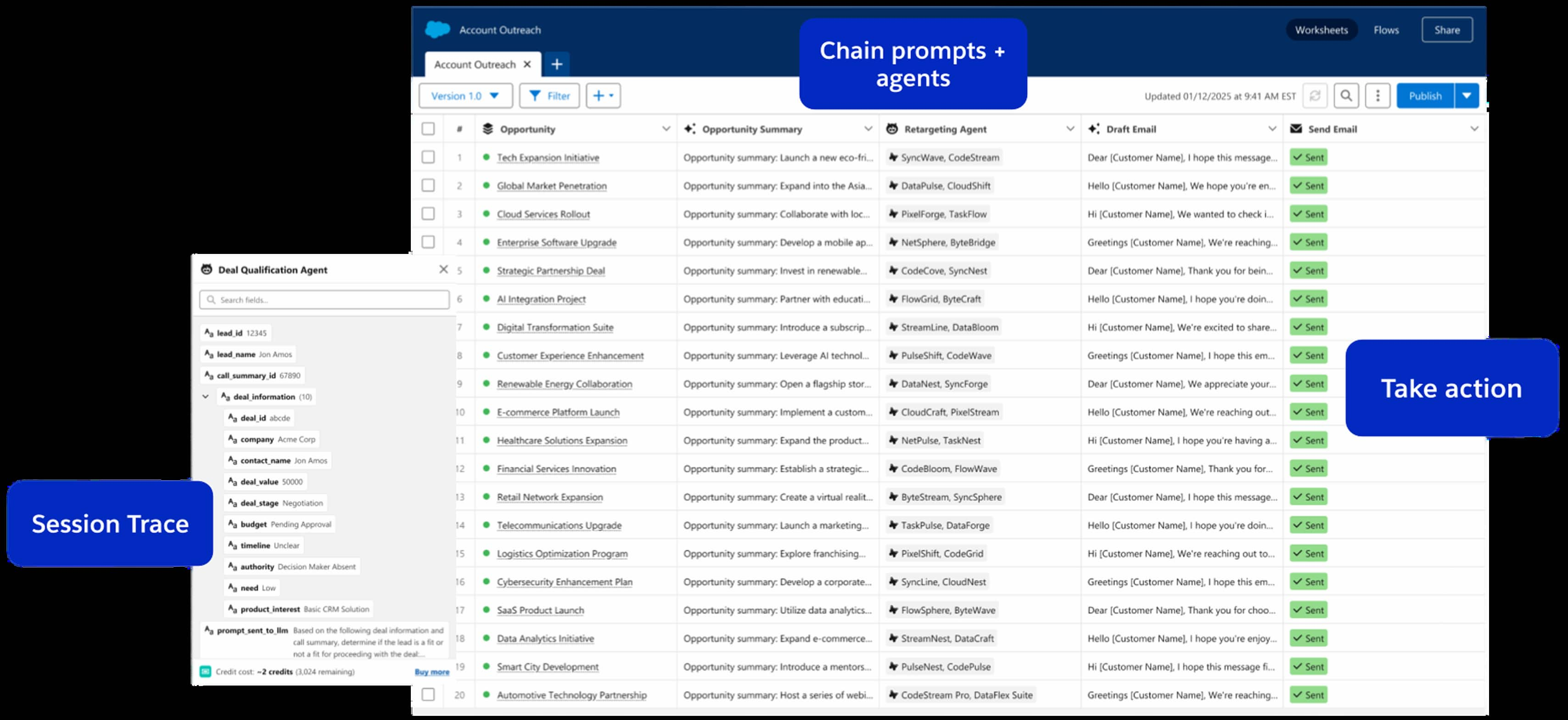
In the following example, Agentforce Grid allows you to:
- Make standard field updates across multiple records, optionally with the help of AI
- Use AI agents and prompts to generate record-specific content, such as email messages, summaries, or classifications
- Enrich or transform records using AI-generated insights or external web searches.
- Test your update process on a subset of records before applying it to the entire dataset
- Review results in real time and refine your approach before writing changes back to Salesforce.
Agentforce Grid requires an Agentforce license. Standard record updates do not consume Flex Credits. Only AI-powered operations (prompts, AI columns, Agents) consume Salesforce Flex Credits. Once you have the correct permissions, you can access Agentforce Grid from the App Launcher or within Agentforce Studio.
How to update a large number of records at the same time
Update a single field with the same value for a small number of records
- Use an existing list view or create a custom list view in Salesforce Classic to select multiple records and edit field values using inline editing.
- If users cannot mass edit records from a list view, see Unable to Inline Edit in a List View for more details.
Update record owners only
- Consider using the Mass Transfer Records tool.
Update a large number of records
When the preceding options are not applicable, use one of the following tools:
- Use the Data Import Wizard
- Or the Data Loader
- Or use Agentforce Grid for intelligent analysis and large-scale data updates up to 1k records
Build a file and update existing records with Data Import Wizard or Data Loader
The most important part of updating existing records with either tool is properly preparing your update file with matching criteria or data.
The best way to prepare your file and ensure that you update the correct Salesforce data is to include existing Salesforce record IDs in your update file. See Add Salesforce IDs of existing records to your import file for more details.
Once your file contains the existing record IDs and the fields and values you want to update, you are ready to proceed.
Use Data Import Wizard when:
- You need to load fewer than 50,000 records.
- The objects you need to update are supported by the wizard.
- For more information, see How do I use the Data Import Wizard to update records that match specified Salesforce IDs?
Use Data Loader when:
- You need to update approximately 50,000 to 100,000 records.
- You need to update an object that is not supported by Data Import Wizard.
- For more information, review Perform Mass Updates , Insert, Update, or Delete Data Using Data Loader , and Installing Data Loader .
Update hundreds of thousands or millions of records
- By default, Data Loader uses the SOAP API to process records.
- To process a larger number of records efficiently, configure Data Loader to use the Bulk API.
- See Using Data Loader with the Bulk API and Bulk API Limits and Allocations for more information.
Flere ressurser
Knowledge-artikkelnummer
000382519
Hjalp denne artikkelen med å løse problemet ditt?
La oss få vite det slik at vi kan forbedre!
