組織を選択
「非公開」の行動について
公開日: May 27, 2026
説明
行動の [非公開] を有効にした際の、上位ロールユーザーやシステム管理者におけるカレンダーの表示制限、および関連レコード設定への影響について説明します 。
解決策
行動を非公開に設定した際の影響
行動の [非公開] チェックボックスを有効にした場合、以下の挙動となります 。
-
関連レコード設定の制限
-
[関連先] 項目および [名前] 項目がグレイアウトし、選択できなくなります 。
-
非公開の行動を他のレコードに関連付けることはできません 。
-

-
他ユーザーからのアクセス制限
-
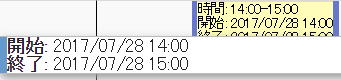
上位ロールのユーザーであっても行動の詳細画面へアクセスできず、カレンダー上では開始・終了時刻のみが表示されます 。件名も表示されません 。
-
組織の共有設定で「カレンダー:詳細の表示」が設定されていても、表示されるのは時間のみです 。
-
「すべてのデータの参照」および「すべてのデータの編集」権限を持つシステム管理者は、該当レコードへのアクセスや編集が可能です 。
-
-
マルチユーザーカレンダービューでの表示
-
[活動設定] で [マルチユーザーカレンダービューに行動の詳細を表示] が有効な場合、黄色の背景に時間が表示されます。
- 設定手順:[設定] | [クイック検索] で「活動設定」を入力し、活動設定の画面にアクセスします 。
-
(補足) [非公開] が無効な場合、上位ロールのユーザーは、[関連先] が設定されていない下位ロールユーザーの行動へアクセスおよび編集が可能です 。
関連ヘルプドキュメント
Salesforce Classic のイベント項目
- 非公開イベントを他のレコードに関連付けることはできません。
ナレッジ記事番号
000382905
この記事で問題は解決されましたか?
ご意見をお待ちしております。
