조직 선택
Inbox를 Microsoft Exchange 계정에 연결하는 방법 알아보기
게시 일자: Jun 11, 2026
솔루션
이 기사를 통해 아래의 내용에 대해 알아보세요.
Exchange 계정 정보를 찾는 데 도움이 필요하신가요?
- Mac용 Outlook에서 Exchange 서버 정보 확인하기
- Mac용 Apple Mail에서 Exchange 서버 정보 확인하기
- Windows용 Outlook에서 Exchange 서버 정보 확인하기
- 도메인 이름 및 사용자 이름 찾기
- 계정 정보 테스트하기
지원하는 Exchange 버전
Salesforce Inbox는 Microsoft Exchange 2013, 2016, Office 365를 지원합니다. 사무실에서 사용하는 Exchange 버전을 모르는 경우 IT 부서에 문의하세요.
필수 및 선택 정보
Exchange 설정은 조직에 따라 매우 상이합니다. 따라서 연결해야 하는 정보 또한 조직에 따라 달라집니다.
다음에 제시되는 정보는 연결을 위해 필수적인 정보입니다.
- 연결하려는 Exchange 이메일 주소
- Exchange 이메일 계정의 비밀번호
다음에 제시되는 정보는 조직에 따라 연결을 위해 필요할 수도 있는 정보입니다.
- 조직에서 보유하고 있는 도메인 및/또는 사용자 이름. 두 가지 정보를 모두 보유하고 있지 않다면 해당 정보가 연결에 필요하지 않습니다. 둘 중 하나, 혹은 두 가지 모두 보유하고 있다면 다음 내용을 확인하세요.
- 도메인 이름 및/또는 사용자 이름을 보유하고 있더라도 해당 정보 없이 Inbox 가입을 우선 시도해 봅니다. Exchange 계정에 연결하기 위해 해당 정보가 필요하지 않을 수도 있습니다.
- 도메인은 nc와 같은 축약형일 수 있습니다.
- 작업 컴퓨터에 로그인할 때는 europe\myusername와 같이 도메인 및 사용자 이름을 조합해야 할 수 있습니다. 이 예시에서 europe은 도메인을, myusername은 사용자 이름을 나타냅니다.
- EWS('Exchange 웹 서비스') 서버 주소라고도 부르는 Exchange 서버 주소. 연결을 할 수 없다면 IT 부서에 문의해서 조직의 EWS 서버 주소 링크(예: https://connect.myorganization.com/ews/exchange.as...)를 제공받으세요. 이때 다음에 유의하세요.
- 주소는 반드시 https://로 시작하고 /ews/exchange.asmx로 끝나야 합니다.
- 이 주소는 온라인에서 이메일에 액세스하는 데 사용하는 링크가 아닙니다.
- 서버 이름이 이메일 주소 형식의 문자와 숫자만 사용하는 경우, EWS 서버 주소 대신 해당 텍스트를 사용합니다.
Mac 운영 체제용 Outlook에서 Microsoft Exchange 정보 찾기
참고: Windows에서 Outlook을 사용하는 경우 여기를 클릭하세요.
1. Outlook에서 Outlook 메뉴 항목을 클릭한 다음 Preferences(환경설정)를 선택합니다.
2. Accounts(계정)을 클릭합니다.
3. Advanced(고급)을 클릭합니다.
4. Server(서버) 탭을 클릭합니다.
Microsoft Exchange의 Server(서버) 필드에서 Exchange 서버 주소를 확인할 수 있습니다.
Mac 운영 체제용 Apple Mail에서 Microsoft Exchange 정보 찾기
1. Apple Mail 상단에서 Mail(메일)을 클릭하고 Preferences(환경설정)을 선택합니다.
2. Accounts(계정)을 클릭합니다.
3. External Server(외부 서버) 필드에서 Exchange 서버 주소를 확인할 수 있습니다. 해당 주소를 왼쪽의 Server Address(서버 주소) 필드에 입력합니다.
Windows용 Outlook에서 Microsoft Exchange 정보 찾기
1. Outlook을 열고 File(파일)을 클릭합니다.
2. Info(정보)를 클릭한 다음 Account Settings(계정 설정) > Account Settings(계정 설정)를 클릭합니다.
3. Inbox에 연결할 이메일 계정을 선택합니다.
4. Change(변경)을 클릭합니다.
5. Server Settings(서버 설정)의 Server(서버) 필드에서 Exchange 서버를 확인할 수 있습니다. 해당 주소를 왼쪽의 Server Address(서버 주소) 필드에 입력합니다.
도메인 및 사용자 이름 찾기
IT 부서에서 Exchange를 구성한 방식에 따라 도메인 및 사용자 이름의 형식은 달라집니다. 형식은 두 가지입니다.
- europe\johndoe와 같이 도메인\사용자이름으로 구성된 형식. 이 예시에서 europe은 도메인을, johndoe는 사용자 이름을 나타냄
- \johndoe와 같이 사용자 이름으로만 구성된 형식.
도메인 및 사용자 이름을 찾는 가장 일반적인 방법은 @와 .com(또는 .org, .net 등) 사이에 위치하는 텍스트 뒤에 백슬래시(\)를 입력한 다음 @ 앞에 오는 텍스트를 입력하는 것입니다.
예시: john@abccompany.com = abccompany\john
Exchange 서버와 도메인\사용자이름을 통해 로그인할 수 없다면 IT 부서에 문의해 자격 증명을 확인하세요. 그래도 로그인할 수 없다면 IT 부서에 다음을 문의하세요.
- 자동 검색이 활성화되어 있는가?
- 자체 서명 인증서를 허용해야 하는가? 그렇다면 More Options(추가 옵션)을 클릭해서 Allow Self-Signed Certificates?(자체 서명 인증서를 허용하시겠습니까?) 박스를 선택한 이후에 다시 시도하세요.
조직 내 계정 정보 테스트
다음 테스트는 전적으로 Salesforce 외부에서 진행되므로, 조직 내에서 제공하는 정보가 정확한지 확인할 수 있습니다.
참고: 이 테스트에는 EWS 서버 주소가 필요합니다. 조직의 EWS 서버 주소를 알지 못하는 경우 이 테스트를 건너뛰세요.
1. 브라우저를 열고 EWS 서버 주소를 입력합니다.
참고: 이때 오류가 발생한다면 EWS 서버 주소가 부정확한 것입니다. 빈 화면이 나타난다면 이후에 다시 시도하거나(이미 로그인한 상태일 수 있음), 다른 브라우저를 사용하세요.
2. 사용자 이름과 비밀번호를 입력합니다. 사용자 이름은 보통 Exchange 이메일 주소이지만 도메인\사용자이름일 수도 있습니다. 각각을 따로 시도해 보세요.
3. Log In(로그인)을 클릭합니다. 로그인에 성공했다면 조직의 Exchange 버전에 따라서 아래와 유사한 결과가 표시됩니다.
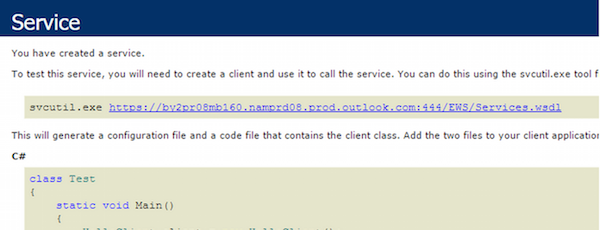
4. 아무 반응이 없거나 로그인 화면이 다시 나타난다면 정보의 일부 또는 전체가 잘못된 것입니다. IT 부서에 문의해서 다시 시도하세요.
참고 항목:
레거시 Inbox 사용 중지
레거시 Inbox 사용 중지
Knowledge 기사 번호
000384221
이 기사를 통해 문제를 해결했습니까?
개선을 위한 의견을 보내주세요.
