Select An Org
Administrator unable to edit page layout in Lightning Experience
Publish Date: Jul 11, 2024
Description
As a system Administrator, you may receive the following error message when you attempt to edit a Page Layout in Lightning Experience.
Error message text
'Insufficient Privileges: You do not have the level of access necessary to perform the operation you requested. Please contact the owner of the record or your administrator if access is necessary. For more information, see Insufficient Privileges Errors.'
Cause
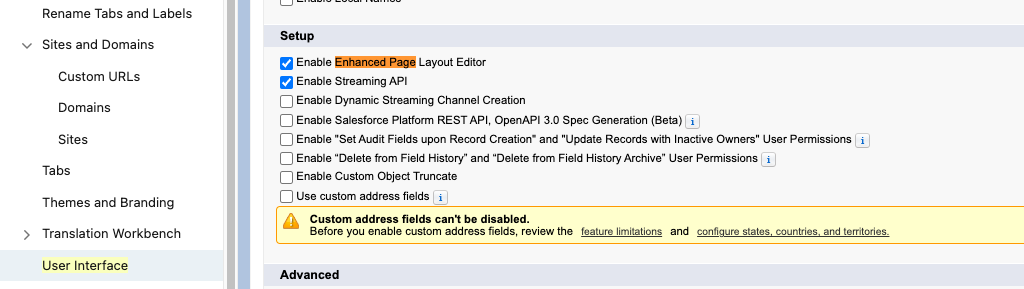
This error displays because Enhanced Page Layout Editor is required but the feature has not been enabled in your organization.
Resolution
Enable Enhanced Page Layout Editor
1. Click Setup.
2. In the 'Quick Find' search field, enter User Interface and scroll down and select User Interface under the User Interface drop-down list.
3. Select the checkbox for Enable Enhanced Page Layout Editor.
4. Click Save.
Knowledge Article Number
000384259
Did this article solve your issue?
Let us know so we can improve!
