組織を選択
レポートに表示される通貨をデフォルト通貨から変更
公開日: May 5, 2026
説明
ユーザーがレポートを作成すると、デフォルト項目に表示される通貨は次のようになります: (取引開始済み) 通貨。レポートの詳細に表示される通貨の制御に使用されます。
組織で [マルチ通貨] を有効にしている場合は、レポートに表示される通貨を変更できます。
解決策
Salesforce Classic 内で表示される通貨を更新する手順:
- [レポート] を選択し、更新するレポートを見つけます。
- レポートの横にある [アクション] の [カスタマイズ] をクリックします。
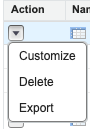
3.[表示] をクリックします。
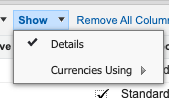
4.[使用する通貨] をクリックします。
5.レポートに表示したい通貨をデフォルトの通貨から変更するために、ドロップダウンリストから代替通貨を選択します。
6.[レポート実行] をクリックします。
Lightning Experience 内で表示される通貨を更新する手順:
- デフォルトの通貨から通貨を変更するレポートを開きます。
- [編集] をクリックします。
- [通貨] (下部の右側) をクリックします。
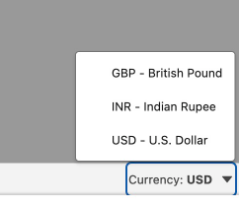
4.レポートに表示したい通貨をデフォルトの通貨から変更するために、ドロップダウンリストから通貨を選択します。
5.[実行] をクリックします。
注意: レポートで選択した通貨は、レポートに基づくすべてのダッシュボードコンポーネントにも適用されます。
その他のリソース
マルチ通貨管理を無効にするための Salesforce アイデアに投票してください。
ナレッジ記事番号
000384322
この記事で問題は解決されましたか?
ご意見をお待ちしております。
