Organisation auswählen
Aktivieren oder Deaktivieren von Popup-Erinnerungen für Aufgaben und Ereignisse
Veröffentlichungsdatum: Apr 3, 2026
Beschreibung
Das Erinnerungs-Popup für Aufgaben und Ereignisse ist standardmäßig in allen Organisationen aktiviert. Administratoren können es unter "Setup" in den Aktivitätseinstellungen deaktivieren.
Lösung
Aktivieren von Popup-Erinnerungen für Aufgaben und Ereignisse
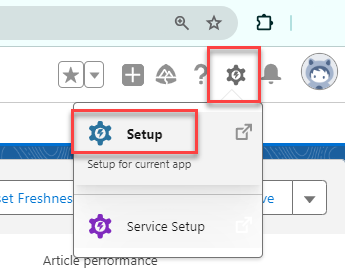
- Klicken Sie oben rechts auf das Zahnradsymbol, navigieren Sie zu Setup und geben Sie im Feld "Schnellsuche" den Text "Aktivitätseinstellungen" ein.
- Klicken Sie auf Aktivitätseinstellungen.
- Wählen Sie Aktivitätserinnerungen aktivieren aus.
- Klicken Sie auf Senden.
Hinweis: Damit Sie Erinnerungs-Popup-Benachrichtigungen erhalten, muss Ihr Popup-Blocker deaktiviert sein.
Deaktivieren von Popup-Erinnerungen für Aufgaben und Ereignisse
- Navigieren Sie zu "Setup" und geben Sie im Feld "Schnellsuche" den Text "Aktivitätseinstellungen" ein.
- Klicken Sie auf "Aktivitätseinstellungen".
- Deaktivieren Sie Aktivitätserinnerungen aktivieren.
- Klicken Sie auf Senden.
Hinweise:
- Dies gilt für Salesforce Classic und Lightning Experience.
- Popups mit Aktivitätserinnerungen werden nicht angezeigt, wenn die einzige in der Organisation geöffnete Seite mit Visualforce erstellt wurde (*.visual.force.com).
Siehe auch:
Aktivieren von Aktivitätserinnerungen
Aktivieren von Aufgabenbenachrichtigungen in Lightning Experience
Einschränkungen für Aufgabenbenachrichtigungen in Lighning
Aktivitätserinnerungen und Benachrichtigungen
Nummer des Knowledge-Artikels
000384759
Konnten Sie Ihr Problem mithilfe dieses Artikels lösen?
Geben Sie uns Feedback, damit wir uns verbessern können.
