Select An Org
Enable or disable pop-up reminders for Tasks and Events
Publish Date: Apr 3, 2026
Description
The Task and Event reminder pop-up is enabled by default in all organizations. Administrators can disable it in Activity Settings under Setup.
Resolution
Turn On Pop-Up Reminders for Tasks and Events
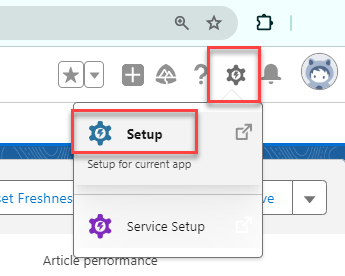
- Click the Gear icon on top right and navigate to Setup and enter Activity Settings in the Quick Find box.
- Click Activity Settings.
- Select Enable Activity Reminders.
- Click Submit.
Note: To receive reminder pop-up notifications, your pop-up blocker must be disabled.
Turn Off Pop-Up Reminders for Tasks and Events
- Navigate to Setup and enter Activity Settings in the Quick Find box.
- Click Activity Settings.
- Deselect Enable Activity Reminders.
- Click Submit.
Notes:
- This is applicable to both Salesforce Classic and Lightning Experience.
- Activity reminder pop-ups will not display if the only page open in the org was created with Visualforce (*.visual.force.com).
Additional Resources
Enable Activity Reminders
Enable Task Notifications in Lightning Experience
Limitations of Task notifications in Lightning
Activity Reminders and Notifications
Knowledge Article Number
000384759
Did this article solve your issue?
Let us know so we can improve!
