Valitse organisaatio
Enable or disable pop-up reminders for Tasks and Events
Julkaisupäivä: Apr 3, 2026
Kuvaus
The Task and Event reminder pop-up is enabled by default in all organizations. Administrators can disable it in Activity Settings under Setup.
Ratkaisu
Turn On Pop-Up Reminders for Tasks and Events
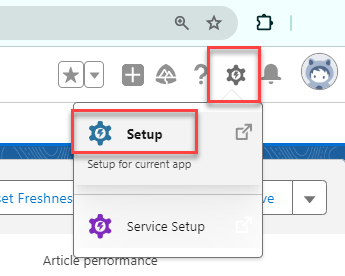
- Click the Gear icon on top right and navigate to Setup and enter Activity Settings in the Quick Find box.
- Click Activity Settings.
- Select Enable Activity Reminders.
- Click Submit.
Note: To receive reminder pop-up notifications, your pop-up blocker must be disabled.
Turn Off Pop-Up Reminders for Tasks and Events
- Navigate to Setup and enter Activity Settings in the Quick Find box.
- Click Activity Settings.
- Deselect Enable Activity Reminders.
- Click Submit.
Notes:
- This is applicable to both Salesforce Classic and Lightning Experience.
- Activity reminder pop-ups will not display if the only page open in the org was created with Visualforce (*.visual.force.com).
Lisäresurssit
Enable Activity Reminders
Enable Task Notifications in Lightning Experience
Limitations of Task notifications in Lightning
Activity Reminders and Notifications
Knowledge-artikkelin numero
000384759
Ratkaisiko tämä artikkeli ongelmasi?
Anna palautetta, jotta voimme kehittyä!
