Valitse organisaatio
Enable Salesforce AppExchange Access
Julkaisupäivä: Apr 22, 2026
Kuvaus
AppExchange is Salesforce's enterprise app marketplace, allowing users to browse, install, and manage third-party applications directly within their Salesforce organization. It supports use cases ranging from installing productivity tools to uploading custom-built apps for distribution. For an overview of the feature, see What is the AppExchange? and Application Installation Guide FAQ.
Available Editions:
AppExchange Download: Group, Professional, Enterprise, Performance (aka Unlimited), Developer
AppExchange Upload: Professional, Enterprise, Performance (aka Unlimited), Developer
How to Activate:
Submit an activation request with Salesforce Support
Prerequisites:
Review the AppExchange documentation linked above before submitting a support request.
Ratkaisu
AppExchange must be explicitly activated by Salesforce Support before it is available in your organization.
Requesting Activation:
If you've reviewed all relevant documentation and still need assistance with activating this feature, please have a System Administrator create an activation request with Support.
Post Activation Steps:
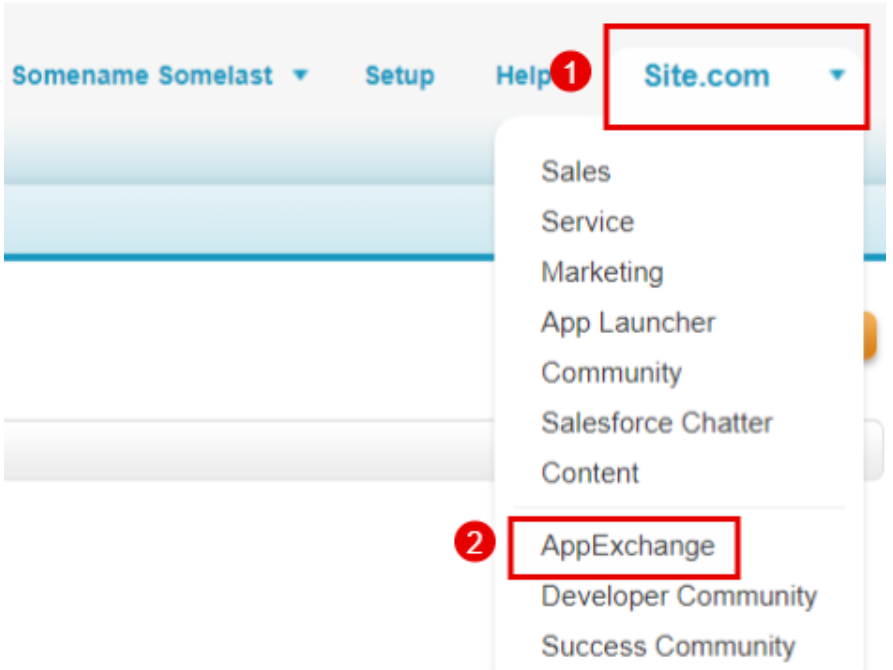
Once activated, a System Administrator can access AppExchange using the following steps:
Classic:
-
Click 'App menu' in the upper right corner of your screen.
-
Then click 'AppExchange' and you will be directed to another page.
-
Click 'login' then you will be automatically logged in using your Salesforce credentials.
Helpful links:
Lightning:
-
Click 'App Launcher', the nine dots in the upper left corner of your screen.
-
Then click 'Visit AppExchange' button.
Additional Notes:
If you receive the "AppExchange is not enabled for your organization" error message, it could mean either:
- Your organization is "Contact Manager edition (not available in this edition)
- You don't have the "Download AppExchange Packages" permission in your profile.
- The affected org is a Patch org. This error is expected if it is a patch org as adding new components is not allowed and upgrading a package in a patch org could introduce new components. This is a hard-coded limitation. The only suggestion we have is to upgrade the main packaging org, then create a new patch org.
Please contact your internal System Administrator for additional questions.
Note: To publish an app in AppExchange, a User must have the permissions 'Create AppExchange packages' and 'Upload AppExchange packages'.
Lisäresurssit
Knowledge-artikkelin numero
000384969
Ratkaisiko tämä artikkeli ongelmasi?
Anna palautetta, jotta voimme kehittyä!
