Sélectionner une organisation
Salesforce Flow: How to Log an Activity When an Email Alert Is Sent Through Flow Automation
Date de publication: Nov 11, 2024
Description
When Salesforce Flow is used to trigger email alerts using the Email Alert action, the sent email is not automatically logged as an activity on the record's Activity Timeline. This means there is no automatic record in the Activity Related List showing that the email was sent via Flow automation. This article describes two approaches to track emails sent through Salesforce Flow: (1) adding a Create Task action to the Flow to manually log the activity, and (2) using the Send Email action in Flow, which supports automatic activity logging to records including leads, contacts, accounts, and opportunities.
Résolution
Option 1: Use a Flow Task to Log the Activity
To log a task activity when a Flow sends an email alert, add a Create Records element to your Flow that creates a Task record simultaneously with the email alert. Configure the Task as follows:
- Status: Completed (so it is used for tracking only and does not appear as an open to-do)
- Subject: A descriptive name such as "Email Sent via Flow"
- Assigned To: Set to the record owner, Flow creator, a specific role, or a specific user
Once the Flow is triggered, the email alert is sent and a completed Task activity is logged on the record at the same time.
Option 2: Use the Send Email Action for Automatic Logging
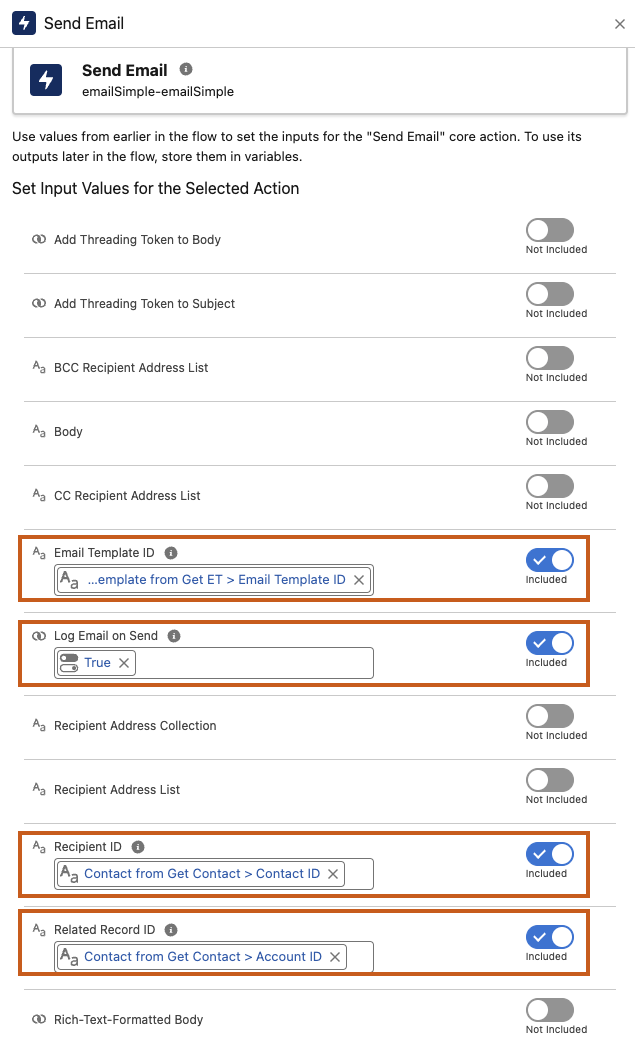
As of a recent Salesforce release, the Send Email action within Flow supports automatic email logging to a record's Activity Timeline. Unlike the Email Alert action, the Send Email action can log the email directly to a recipient record (leads, contacts, or personal accounts) or to a non-recipient record (such as an Account or Opportunity), or both.
Note: This automatic logging feature is only available when using the Send Email action in Flow (not the Email Alert action), and must be configured individually for each Send Email action element in the Flow.
Email alerts generated by automation systems such as Process Builder or Workflow Rules do not automatically get stored in Salesforce's Activity Timeline. Using the Send Email action in Flow is the recommended approach for email communications that require activity tracking.
Ressources supplémentaires
Flow Element: Send Email
Numéro d’article de la base de connaissances
000385146
Cet article a-t-il résolu votre problème ?
Dites-nous ce que nous pouvons améliorer !
