組織を選択
Salesforce 組織 ID の確認
公開日: Jun 16, 2026
説明
Salesforce 組織 ID は、お客様の Salesforce アイデンティティを一意に識別する重要な情報です。サポートケースを開く際や新機能の有効化を要求する際に必要です。Classic では [設定] | [管理] | [組織プロファイル] | [組織情報] から、Lightning では歯車アイコンをクリックし、[設定] | [会社の設定] | [組織情報] から確認できます。Sandbox 組織では更新ごとに新しい ID が割り当てられます。詳細は Salesforce の動画チュートリアルやヘルプポータルを参照してください。
本番環境と Sandbox 組織では組織 ID が異なります。Sandbox は、更新されるたびに新しい ID が割り当てられます。
データローダ:レコードを更新するための 15 文字と 18 文字の ID
解決策
Salesforce 組織 ID の確認
- Classic の場合: [設定] | [管理] 下の | [組織プロファイル] | [組織情報] をクリックします。
- Lightning の場合: 歯車アイコンをクリックし、[設定] | [会社の設定] | [組織情報] の順にクリックします。
上記の手順を実行したら「Salesforce.com 組織 ID」を検索します。 組織 ID は [組織情報] ページの右側の列にあります。
Salesforce インスタンスでこれらの項目を検索するのに役立つ動画については、このトピックに関する Salesforce の動画チュートリアルを参照してください。
組織 ID は Salesforce ヘルプポータルでも確認できます。
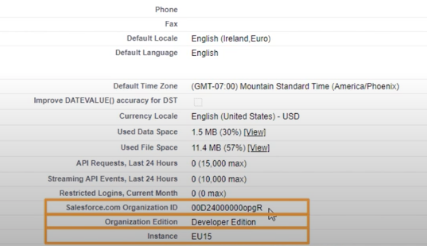
1. Salesforce ヘルプにログインします。
2.右上にある [カスタマーサポートへの連絡] を選択してサポートランディングページを開きます。
3.Salesforce の見出しの下に組織 ID が表示されます。
MuleSoft Anypoint OrgID の場合は、「How to know my Organization ID (Org ID) on the Anypoint Platform」(Anypoint プラットフォームで組織 ID (Org ID) を確認する方法) のヘルプ記事を参照してください。
ナレッジ記事番号
000385215
この記事で問題は解決されましたか?
ご意見をお待ちしております。
