Seleziona un'organizzazione
Hide the 'Quick Create' section from Overview Pages
Data pubblicazione: Jun 7, 2026
Descrizione
Salesforce Administrators can hide the Quick Create feature from all overview pages. The Quick Create feature allows end users to create Account, Contact, or Opportunity records quickly with minimal required fields. Hiding this feature ensures that users must complete all required fields before saving a new record.
Risoluzione
The Quick Create feature allows users to create a new record quickly by entering just a few fields to create a new Account, Contact or Opportunity.
Administrators have the ability to hide the quick create section from all overview pages. This will prevent Users from creating new records without entering all required fields. At this time it is possible to hide the Quick Create sections from either all overview pages, or no overview pages. It is not possible to hide the quick create section from just one or two of the overview pages.
Hide Quick Create in Salesforce Classic
- Go to Setup | Customize | User Interface
- Deselect Show quick create
- Click Save
Hide Quick Create in Lightning Experience
- Click on the Gear Icon | Setup | User Interface | User Interface
- Deselect Show quick create
- Click Save
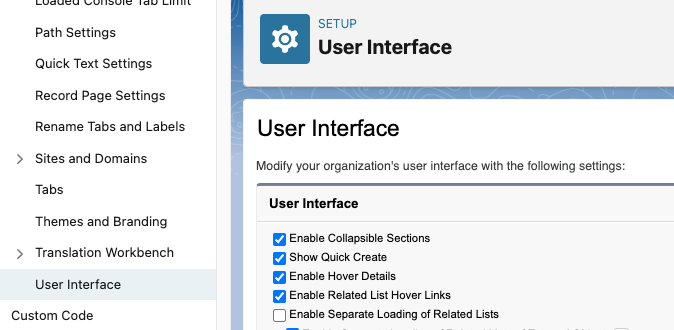
This will hide the Quick Create section for all Users.
Note: The 'Show Quick Create' setting also affects whether or not Users can create new records from within the lookup dialog. For example, with the setting enabled, Users can create a new Account within the Account lookup dialog while creating or editing a Contact.
Creating new records in the lookup dialog is available only if Quick Create is available for the type of record being created. In addition, Users always need the appropriate 'Create' permission to use Quick Create, even though it will be displayed for all Users.
To remove the ‘Create New..’ section from the Home page only available in Classic:
In Classic:
Setup | Customize | Home Page Layouts, select Edit for a layout, deselect the box for Create New…, click Next, then Save.
Note: If the User is still able to see the Create New on the objects, then make sure under Setup | Customize | User Interface | under Sidebar section | option 'Show Custom Sidebar Components on All Pages' needs to be checked. The Create New option will not be visible to the Users.
Important Notes :
The 'Show Quick Create' setting also controls whether users can create new records from within lookup dialogs. Users always need the appropriate 'Create' permission to use Quick Create even when displayed. To remove the 'Create New' section from the Home page (Classic only): Setup | Customize | Home Page Layouts | Edit layout | deselect Create New... | Next | Save.
Risorse aggiuntive
Vote and comment on the Idea to Disable Quick Create 'New' button on lookup window in Lightning+Community UI.
See also
Create Records with Quick Create
Numero articolo Knowledge
000385232
Questo articolo ha risolto il problema?
Facci sapere, così possiamo migliorare!
