Выбрать организацию
Change record values to blank or null with Data Loader
Дата публикации: Jun 21, 2026
Описание
By default, Data Loader will treat any blank cells in your CSV file as though no change is needed for that field. If you'd like to use Data Loader to remove the value of a fields so it will appear as blank or NULL, update the Data Loader settings to enable "Insert Null Values".
Решение
Warning: Always back up your data before performing any data operation. It is recommended to run a test with a small subset of records to ensure the operation was successful by manually opening and verifying that the corresponding records are correct in Salesforce. See Export Backup Data from Salesforce or Export Data for more details.
Include NULL values in an update
- Open Data Loader.
- Click Settings.
- Select Insert Null Values.
- Click OK.
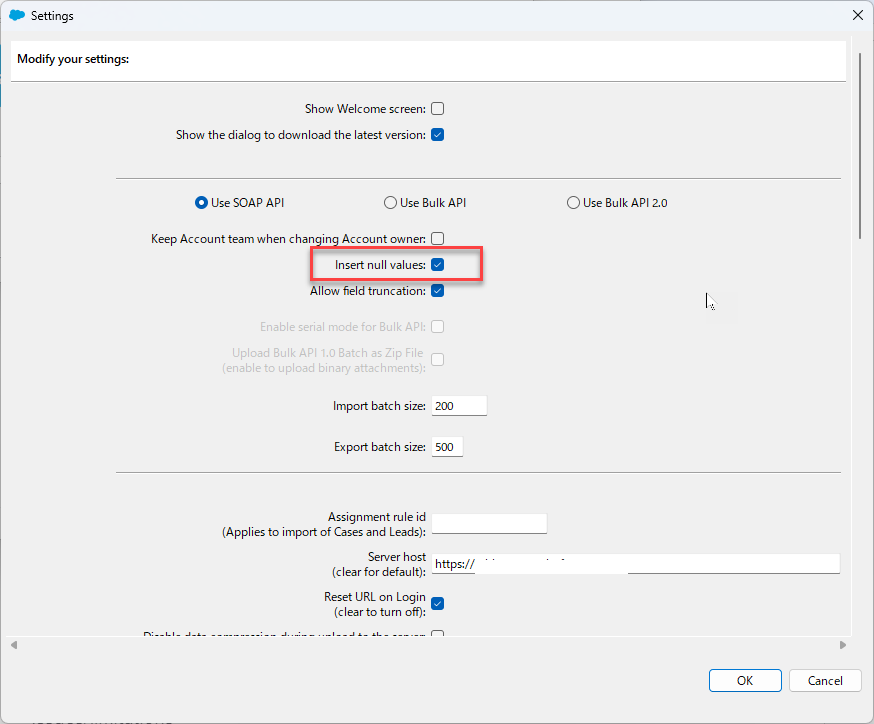
Note: Due to screen resolution settings, you may not see the OK button. The Enter or Return keys should save the settings if the resolution settings cannot be adjusted.
Example
1. Run Export Data. Make sure to include IDs and any fields that should be changed to NULL.
2. Delete data contained in the columns that should be returned as NULL (no values).
3. Save the file as a new .CSV with new name. Don't overwrite the Data Export from step 1 so that you can keep it as a backup of your data.
4. Run Data Loader Update using new file with Blank values.
Potential Issues
- If the field being updated to NULL is referenced by a workflow or trigger, the update might not be successful. (One workaround you can try is to lower the batch size to 1, then proceed with the update or insert again).
- If the field is Required in your organization, you will not be able to use this method to insert a NULL value.
Дополнительные ресурсы
Data Loader behavior with Bulk API enabled using 'Insert null values'
How to Change Record Values to Blank or Null with Data Loader
How to Download and Install Data Loader
Номер статьи базы знаний
000385542
Эта статья решила вашу проблему?
Оставьте свой отзыв, чтобы мы могли стать лучше!
