組織を選択
Salesforce for Outlook - メールの追加時のよくある問題
公開日: Jun 17, 2022
説明
下記で言及しているすべてのナレッジ記事のリスト
記事番号 000199147
記事のタイトル: Salesforce for Outlook サイドパネルを使用してメールを追加することができない - Error in getting contacts
記事番号 000212913
記事のタイトル: Salesforce for Outlook - メールを追加しようとするとサイドパネルの「We couldn't add this item. Please try adding this item again.」エラー
記事番号 000186553
記事のタイトル: Salesforce for Outlook のサイドパネルで [メールを追加] の封筒アイコンが表示されない
記事番号 000229910
記事のタイトル: Salesforce for Outlook: メールは追加できるが添付ファイルが追加できない -「この項目を追加できませんでした。この項目の追加を再試行してください。」
記事番号 000213141
記事のタイトル: Salesforce for Outlook - Salesforce に追加したメールが Outlook から消える
開始する前に、メールの関連付けのしくみに関する次の記事を参照することをお勧めします。
記事番号 000211889 - Add Email using the Salesforce for Outlook Side Panel
記事番号 000211788 - Salesforce for Outlook サイドパネルを使用し、複数の Salesforce レコードにメールを追加する
メールの関連付けが失敗した場合の [メールを追加] ボタン (サイドパネルではない) を使用した一般的なトラブルシューティング手法
記事番号 000211788 - Salesforce for Outlook サイドパネルを使用し、複数の Salesforce レコードにメールを追加する
メールの関連付けが失敗した場合の [メールを追加] ボタン (サイドパネルではない) を使用した一般的なトラブルシューティング手法
1- Outlook をオフラインにします。
2- メールを選択し [メールを追加] ボタンをクリックします。送信トレイを確認します。
3- 送信トレイに 1 通のメールが表示されます。選択した元のメールは、この新しいメールに添付ファイルとして追加され、[メール To Salesforce] のアドレスが [宛先] 項目に設定されています。
この情報が適切な場合は、Outlook を再びオンラインにして、インターネットへの接続がありメールを送信できるかどうかを確認します。
メールを正常に送信できる場合は、プラグインは正常に機能しています。さらに調査が必要な場合は、Salesforce サポートにお問い合わせください。この問題は、会社のファイアウォールに関係している可能性もあるため、社内の IT 部門にもお問い合わせください。(サポートにお問い合わせいただく場合は、メールを追加しようとした日時をお知らせください。また、Salesforce for Outlook のログファイルを添付してください。)
2- メールを選択し [メールを追加] ボタンをクリックします。送信トレイを確認します。
3- 送信トレイに 1 通のメールが表示されます。選択した元のメールは、この新しいメールに添付ファイルとして追加され、[メール To Salesforce] のアドレスが [宛先] 項目に設定されています。
この情報が適切な場合は、Outlook を再びオンラインにして、インターネットへの接続がありメールを送信できるかどうかを確認します。
メールを正常に送信できる場合は、プラグインは正常に機能しています。さらに調査が必要な場合は、Salesforce サポートにお問い合わせください。この問題は、会社のファイアウォールに関係している可能性もあるため、社内の IT 部門にもお問い合わせください。(サポートにお問い合わせいただく場合は、メールを追加しようとした日時をお知らせください。また、Salesforce for Outlook のログファイルを添付してください。)
解決策
シナリオ 1
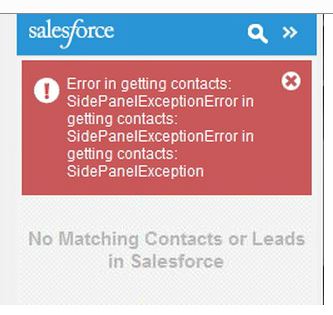
ユーザが、サイドパネルで [メールを追加] の封筒アイコンメールをクリックしてメールを追加できません。サイドパネルには赤のエラーメッセージが表示され、メールの追加が試行されますが停止し、封筒アイコンが緑になりません。
根本原因
影響を受けるユーザのプロファイルで、ToDo オブジェクトの [名前]、[コメント]、[期日] 項目が参照できず、FLS (項目レベルセキュリティ) が非表示に設定されています。
解決策
この問題に対処するには、記事番号 000199147 を参照してください。
記事のタイトル: Salesforce for Outlook サイドパネルを使用してメールを追加することができない - Error in getting contacts
*******************************
シナリオ 2
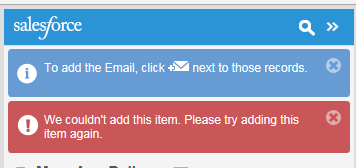
Outlook で、受信トレイまたはその他のフォルダ内でメールを選択したり、新しいメールを作成したり、メールに返信したりするときに、サイドパネルを使用して Salesforce のレコードにメールを関連付けようとすると、レコード名の隣にある封筒アイコンをクリックしたときに、サイドパネルにエラーメッセージが表示されます。
根本原因
断定はできませんが、次のいずれかが原因になっている可能性があります。
- ToDo オブジェクトの入力規則
- ワークフロールール
- Apex トリガ
- メールの本文/コンテンツが大きすぎる ([説明] 項目)
- ワークフロールール
- Apex トリガ
- メールの本文/コンテンツが大きすぎる ([説明] 項目)
解決策
この問題に対処するには、記事番号 000212913 を参照してください。
記事のタイトル: メールを追加しようとするとサイドパネルの「We couldn't add this item. Please try adding this item again.」エラー
*******************************
シナリオ 3
サイドパネルに小さな [メールを追加] の封筒アイコン 
根本原因
組織で [メールを追加] オプションが有効になっていません。
この問題に対処するには、記事番号 000186553 を参照してください。
記事のタイトル: Salesforce for Outlook のサイドパネルで [メールを追加] の封筒アイコンが表示されない
*******************************
シナリオ 4
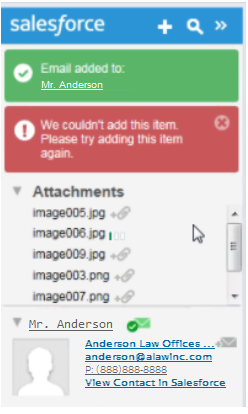
サイドパネルで封筒アイコン をクリックするとメールが Salesforce レコードに追加されますが、添付ファイルを選択すると、次のエラーで失敗します。
をクリックするとメールが Salesforce レコードに追加されますが、添付ファイルを選択すると、次のエラーで失敗します。
SFO ログファイルに次のログが含まれます。
2015-08-07 13:21:18,675 [VSTA_Main ] WARN adxsidepanel ::JAVASCRIPT::ERROR::AssociationError::xhr=[object Object]:status=error:error=Unauthorized:xhr.message=Session expired or invalid:xhr.code=INVALID_SESSION_ID:xhr.fields=undefined
2015-08-07 13:21:18,679 [VSTA_Main ] WARN adxsidepanel ::JAVASCRIPT::We couldn't add this item.Please try adding this item again.
2015-08-07 13:21:18,805 [VSTA_Main ] WARN adxsidepanel ::JAVASCRIPT::ERROR::We couldn't add this item.Please try adding this item again.
根本原因
この問題は SFO や SFO の設定には関係ありません。影響を受ける組織で [ログイン時の IP アドレスとセッションをロックする] を無効にする必要があります。
解決策
この問題に対処するには、記事番号 000229910 を参照してください。
記事のタイトル: Salesforce for Outlook: メールは追加できるが添付ファイルが追加できない -「この項目を追加できませんでした。この項目の追加を再試行してください。」
*******************************
シナリオ 5
Salesforce に追加したメールが Outlook から消える
根本原因
メールの分類項目が変更され、現在の Outlook の表示ではリストの最後に表示されます。
解決策
この問題に対処するには、記事番号 000213141 を参照してください。
記事のタイトル: Salesforce for Outlook - Salesforce に追加したメールが Outlook から消える
ナレッジ記事番号
000385729
この記事で問題は解決されましたか?
ご意見をお待ちしております。
