Sélectionner une organisation
Duplicate Entries Showing for Objects When Creating a Salesforce Custom Report Type
Date de publication: Jul 3, 2026
Description
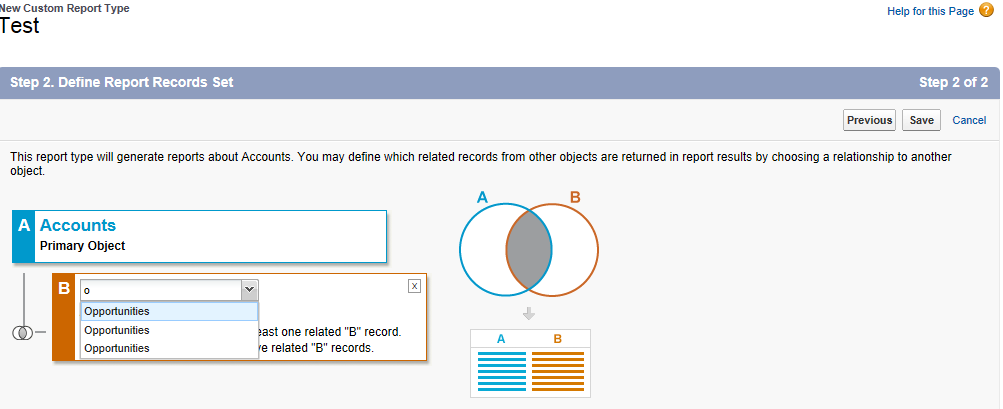
When creating a Salesforce custom report type, duplicate entries for objects like "Opportunities" can appear when performing the Define Report Records setup step.
Example: When "Accounts" is selected as the primary object, and "Opportunities" is the desired child object.
Depending on your organization's setup, the "Opportunities" child object may be available in the list of child objects two, three, or more times.
Résolution
This behavior occurs when an object has various Lookup or Master/Detail relationship fields and the "Related List Label" for all those relationship fields are the same.
Example: On the "Opportunity" object, an administrator may have created multiple fields with lookup relationships to the "Account" object. By default, the "Related List Label" becomes "Opportunities" for all the lookup fields created.
When you create a report type on the Parent object (Account), it shows Opportunities listed more than once due to the multiple look-up fields.
The resolution is to change the "Related List Label" for these fields to something different, which will then display this name listed once. This in turn will avoid the confusion, and we will be able to create a Report Type with the correct child object relationships. To see more information on how to change the related list label, view the following article to Rename a Related List Label that also contains a helpful video.
Ressources supplémentaires
Numéro d’article de la base de connaissances
000386238
Cet article a-t-il résolu votre problème ?
Dites-nous ce que nous pouvons améliorer !
