組織を選択
Salesforce for Outlook アドインを使用していると、Outlook で添付ファイルを開くことができないか、ダウンロードすることができない。
公開日: Jun 15, 2026
説明
Salesforce for Outlook アドインを使用している際に、Outlook で添付ファイルを開けないことがあります。Temporary Internet Files (テンポラリーインターネットファイルズ) フォルダの容量不足が要因であった場合には、フォルダを空にすることで解決できます。手順としては、Outlook と SFO を終了し、レジストリエディタを使用してテンポラリフォルダの場所を特定してフォルダ内のファイルを削除します。
解決策
この問題を解決するために、以下のステップを試してください。
ステップ 1
ステップ 1
Outlook を終了し、バックグラウンドで実行されていないことを確認します。
タスクマネージャーを起動するため、キーボードの Ctrl + Alt + Del キーの組み合わせを使用することができます。そして、プロセスタブに OUTLOOK.exe プロセスが存在する場合は、それを終了します。
タスクマネージャーを起動するため、キーボードの Ctrl + Alt + Del キーの組み合わせを使用することができます。そして、プロセスタブに OUTLOOK.exe プロセスが存在する場合は、それを終了します。
ステップ 2
Salesforce for Outlook (SFO) を終了します。
画面右下隅のシステムトレイ内の SFO アイコンを右クリックし、[終了] をクリックします。
画面右下隅のシステムトレイ内の SFO アイコンを右クリックし、[終了] をクリックします。
** 下記では、レジストリエディタの使用を必要とすることに注意してください **
レジストリエディタを誤って使用すると、深刻な事態が生じ、オペレーティングシステムを再インストールする必要がある場合があります。コンピュータのレジストリをバックアップするために、https://support.microsoft.com/ja-jp/kb/322756 の記事を参照するか、下記のステップを実行するために、貴社の IT 部門に問い合わせてください。
ステップ 3
次に、テンポラリフォルダの場所を探す必要があります。
Temporary Internet Files フォルダ内に Outlook が作成する (あるいは Outlook のインストールによって作成される) サブフォルダの名前は極めてランダムです。
Outlook 2007 、2010、および 2013 では、このフォルダは、Content (コンテンツ) と呼ばれています。Outlook は 8 個のランダムな数字と文字で名前が付けられるサブフォルダを持っています。
さらに、デフォルトでは、空にするためにそのフォルダを簡単にブラウズすることができません。Outlook のテンポラリフォルダへのアクセスは、2 つの簡単な手順で実行できます。レジストリエディタでフォルダを探してから、そのフォルダへ移動します。
Temporary Internet Files フォルダ内に Outlook が作成する (あるいは Outlook のインストールによって作成される) サブフォルダの名前は極めてランダムです。
Outlook 2007 、2010、および 2013 では、このフォルダは、Content (コンテンツ) と呼ばれています。Outlook は 8 個のランダムな数字と文字で名前が付けられるサブフォルダを持っています。
さらに、デフォルトでは、空にするためにそのフォルダを簡単にブラウズすることができません。Outlook のテンポラリフォルダへのアクセスは、2 つの簡単な手順で実行できます。レジストリエディタでフォルダを探してから、そのフォルダへ移動します。
そのフォルダの場所は、以下のレジストリキーに保存されています。
| Outlook のバージョン | レジストリキー |
|---|---|
| Outlook 2007 | HKEY_CURRENT_USER\Software\Microsoft\Office\12.0\Outlook\Security |
Outlook 2010 | HKEY_CURRENT_USER\Software\Microsoft\Office\14.0\Outlook\Security |
Outlook 2013 | HKEY_CURRENT_USER\Software\Microsoft\Office\15.0\Outlook\Security |
これを行うためには、Windows キー + R キーの組み合わせを使用して [ファイル名を指定して実行] ウィンドウを開き、REGEDIT と入力するか、検索ボックス ([スタート] | [検索] ボックス) で REGEDIT と入力することにより、レジストリエディタを起動します。
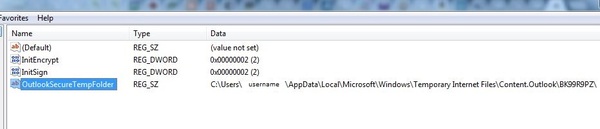
ステップ 5
そのフォルダへアクセスします。検索ボックス、あるいは、現在開いている Windows フォルダまたはエクスプローラーのアドレスバーに、上記でコピーしたパスをペーストします。
ステップ 6
そのフォルダ内のすべてのファイルを削除します。
ステップ 7
Microsoft Outlook を再起動します。これで、添付ファイルを開き、保存することができるようになるはずです。
ナレッジ記事番号
000386333
この記事で問題は解決されましたか?
ご意見をお待ちしております。
