Valitse organisaatio
Enable the 'Create Audit Fields' Permission in Salesforce
Julkaisupäivä: Jun 17, 2026
Kuvaus
The Create Audit Fields feature in Salesforce allows System Administrators to grant users the ability to set system audit fields (such as Created By, Created Date, Last Modified By, and Last Modified Date) when inserting records through API tools like Data Loader or Salesforce Flows. This is useful for data migrations where you need to preserve the original creation timestamps and authors from a source system.
Available in: Essentials, Enterprise, Performance, Unlimited, and Developer Editions
Important: While Create Audit Fields is a low-risk feature, Salesforce recommends reviewing the available documentation before enabling it. Key reference articles are listed in the Additional Resources section below.
There are two organization-wide permissions associated with this feature:
- Set Audit Fields upon Record Creation — Allows users to set audit fields (such as Created By or Last Modified By) when creating records via API import tools
- Update Records with Inactive Owners — Allows users to update record ownership and sharing-based records that have inactive owners
Note: With these permissions, Lightning and API users can fill audit fields on record creation only through API tools. Edits cannot be made after the record is created.
In Salesforce Classic, APEX code cannot be used to update Lead record owners to inactive users, even when users have the "Set Audit Fields upon Record Creation" and "Update Records with Inactive Owners" permissions assigned.
Ratkaisu
Step 1: Enable the Create Audit Fields Org-Wide Permissions
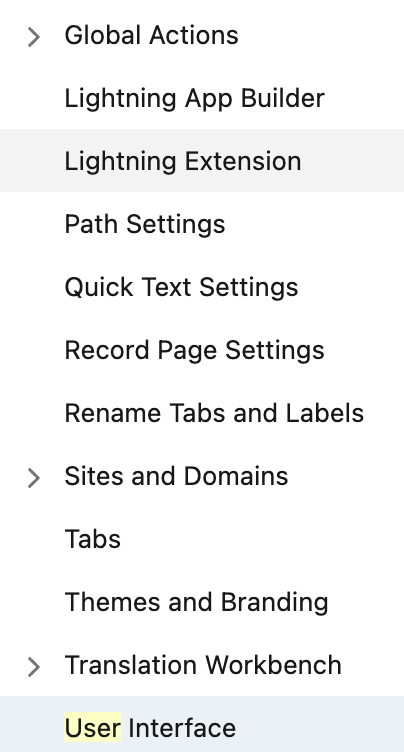
- From Setup, enter
User Interfacein the Quick Find box and select User Interface
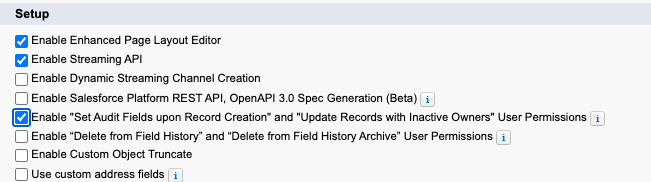
The User Interface settings page displays a list of configurable UI options for your org. - Scroll down to the Setup section and select the checkbox for: Enable "Set Audit Fields upon Record Creation" and "Update Records with Inactive Owners" User Permissions
This checkbox enables the two audit field permissions at the organization level, making them available to assign to user profiles and permission sets. - Click Save
Step 2: Grant Profile Permissions to Custom Profile Users
After enabling the org-wide permissions, grant the following permissions to users with custom profiles. Note: Standard profiles cannot receive these permissions — use a permission set instead (see Step 3).
- Set Audit Fields upon Record Creation — Allows the user to set audit fields (like Created By or Last Modified By) when creating records via API import tools like Data Loader
- Update Records with Inactive Owners — Allows the user to update the record owner and sharing-based records with inactive owners
Step 3 (Optional): Create and Configure a Permission Set for Standard Profile Users
If your users are on standard profiles (which cannot be modified), create a Permission Set to assign these permissions:
- From Setup, follow the steps in Create Permission Sets
- While creating the permission set, navigate to System Permissions and enable either:
- Set Audit Fields upon Record Creation, or
- Update Records with Inactive Owners
- Click Save
- Assign the permission set to users by following Assign a Permission Set to Multiple Users
Note: Create Audit Fields can be enabled for Professional Edition after the Salesforce API has been provisioned. See Salesforce Editions with API Access for more information.
Knowledge-artikkelin numero
000386699
Ratkaisiko tämä artikkeli ongelmasi?
Anna palautetta, jotta voimme kehittyä!
