Select An Org
Create and Manage Designated Contacts on Salesforce Help
Publish Date: Oct 10, 2025
Description
Designated Contacts (DCs) are a feature of Premier and Signature Success Plans.
Designated Contacts (DCs) are users in your organization who have unique permissions to access Support and other Premier and Signature features.
DCs should have sufficient knowledge of Salesforce and your organization's environment to work with Success Plan offerings that include Salesforce Support. DCs are typically business stakeholders such as Salesforce administrators, IT contacts, and subject matter experts.
Primary Designated Contacts (Primary DCs) can create, view, deactivate, and edit the permissions of other DCs in their organization.
An individual must be a registered user on the org, and have logged into the Help Portal previously, in order to be assigned as a Designated Contact.
If you are a Tableau customer on a Premium or Extended Support plan, please see Create and Manage Designated Contacts on Salesforce Help for Tableau Premium and Extended Support Customers.
Resolution
Your Salesforce Account Manager will automatically assign your first Primary DC. The Primary DC can then create and maintain additional DCs.
Determine if a User Is a DC or a Primary DC
To determine if a user is a DC or a Primary DC:
- Log in to Salesforce Help.
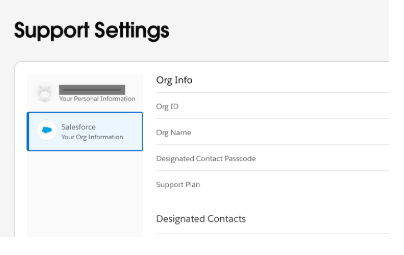
- Click on your avatar on the upper-right-hand side of the page.
- Select Support Settings.
- Beneath your contact information, a message will be displayed indicating if you're a Primary Designated Contact for the org. A View Permission link will also be visible to manage Designated Contact permissions within your organization if you are a Primary Designated Contact. You are a Designated Contact if this message is not visible under your contact information.
- To view a list of all Primary DCs in your org, select Your Org Information.
- A list of all Primary DCs will appear at the bottom of Your Org Information.
Create and Maintain DCs (for Primary DCs Only)
The first Primary DC is set up by Salesforce. If no Primary DC has been set up, or you need to update your Primary DC, please reach out to your Account Executive.
Alternatively, you can submit a case to Salesforce Support to locate your Account Executive to assist in creating or identifying the Primary DC. Users with the System Administrator profile can make this request to Support. For more information on creating a Support case, please review How to Create a Case on Salesforce Help.
A Primary DC has Full Administrative Rights and Manage Designated Contacts checked on their DC record. If either of these are unchecked, the user will lose their Primary DC status.
Understanding Permissions
Primary DCs have View All Cases by default for the selected Org. A Primary DC can see all support cases logged against any Org they have permission to access. Primary DCs can enable View All Cases for other DCs in their org creating an "Admin Designated Contact" that has additional permissions along with the defaults listed below. The Admin Designated Contact cannot manage DC users.
DCs, where entitled, have the following permissions by default:
| Permission | Primary DC | DC | Standard User |
| View Case (own) | Yes | Yes | Yes |
| View All Cases | Yes | No | No |
| Create Case | Yes | Yes | Yes |
| Manage DCs | Yes | No | No |
| View DC Permissions | Yes | Yes | No |
| Edit DC Permissions | Yes | No | No |
| Expert Coaching request | Yes | Yes | Yes |
| Escalate Case | Yes | Yes | Yes |
View DC Permissions
Any DC can view their own permissions. However, only Primary DCs can view and edit permissions for other DCs.
To view DC permissions:
- Log in to Salesforce Help.
- Click on your avatar on the upper-right-hand side of the page.
- Select Support Settings.
- Beneath your contact information a message will be displayed indicating if you're a Primary Designated Contact. Click View Permissions, then click on the your contact name to view your permissions.
Note: Primary DCs and other DCs will have view access across all customer Clouds if they have the "view all cases" role.
Add a DC or Change DC Permissions
To edit permissions or assign a new DC, you must be a Primary DC.
To change DC permissions or add a DC:
- Log in to Salesforce Help.
- Click on your avatar on the upper-right-hand side of the page.
- Select Support Settings.
- Beneath your contact information a message will be displayed indicating if you're a Primary DC. Click View Permissions, then click on your contact name to view your permissions.
- Select Your Org Information to assign permissions:
- Adding a contact as a DC - Click Add New and enter email or first name / last name to search.
- Note: Only active Salesforce licensed users who have previously accessed the Help Portal are returned in DC search results. Users who haven't logged into the Help Portal should Navigate to the Help Portal from within Salesforce so they can be set up as a DC.
- Make a contact a Primary DC - Click > to the left of the contact name and check Manage Designated Contacts (this enables the DC to manage others and assign administration access).
- Make a contact an admin contact who can View All Cases - Click > to the left of the contact name and check View all Cases (this enables a DC to view all cases for their account).
How to Activate or Deactivate Designated Contacts
Only Primary DCs can suspend the rights for DCs and other Primary DCs by selecting Deactivate for the Designated Contact.
If a Primary DC wishes to re-enable the DC, the Primary DC can select an inactive DC from the list and click Activate.
More Resources
Resources for contacting Salesforce Support:
Note: DCs are a feature of Salesforce, Marketing Cloud, Commerce Cloud, Quip, Marketing Cloud Intelligence and MuleSoft with Premier and Signature Success Plans.
Knowledge Article Number
000386786
Did this article solve your issue?
Let us know so we can improve!
