조직 선택
Create a Salesforce Report to Display Contact Birthdays in a Specific Month
게시 일자: Jul 3, 2026
상세 설명
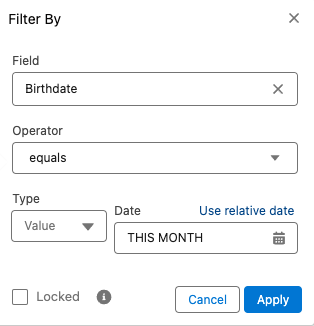
This article explains how to create Salesforce reports to view Contact records that have birthdays within a specific calendar month or within the next 30 days. Salesforce reports support relative date filters on date fields such as Birthdate, which allows you to build dynamic birthday reports that automatically update without manual date entry. This is useful for sales teams who want to send birthday greetings or account management teams tracking renewal cycles tied to contact birthdays." Images: For each screenshot, add a text description immediately before or after the image tag, e.g.: "The screenshot below shows the Birthdate filter configuration with the 'THIS MONTH' relative date option selected in the report builder."
솔루션
The steps below will use the Relative Date Filter or Groupings.
Create a report for birthdays in the next 30 days
- Create a report on the Contact object
- For the date filter, use "Created Date" with the range set as "All Time"
- Add a custom filter for the "Birthdate" field, where Operator is equals, then select Use Relative date, and set to NEXT 30 DAYS
- If desired, add another custom filter to select a specific account only
Create a report for birthdays in the current month
- Create a report on the Contact object
- For the date filter, use "Created Date" with the range set as "All Time"
- Add a custom filter for the "Birthdate" field, where the Operator is equals, and Use Relative date is set to THIS MONTH
Create a report grouped by month
- Create a report on the Contact object
- For the date filter, use "Created Date" with the range set as "All Time"
- If using the Classic Builder, change the report's format to "Summary"
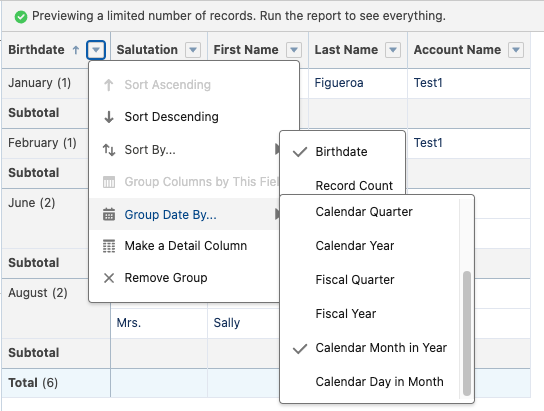
- Create a grouping on the "Birthdate" field
- Select the arrow next to the new grouping and select Group Dates by | Calendar Month in Year
추가 자원
For more advanced or alternate reports, please visit the Salesforce Trailblazer Community and post your formula question.
Knowledge 기사 번호
000386956
이 기사를 통해 문제를 해결했습니까?
개선을 위한 의견을 보내주세요.
