Vælg en organisation
Salesforce Performance and Scale Test FAQs
Udgivelsesdato: Jul 1, 2026
Beskrivelse
Salesforce Performance Testing and Scale Test Overview
This article explains how to request and run performance and scale tests in Salesforce, including the difference between performance tests (at or below 120 RPS) and Scale Tests (above 120 RPS).
Important: Salesforce Support cannot design or interpret customer scale test results. Support's role is to monitor test activity and confirm that there are no issues with Salesforce services during testing.
Performance Test vs. Scale Test — Key Difference
- Performance Test (at or below 120 RPS): Request via the LAP (Limit, Activation, Permissions) process through Salesforce Support.
- Scale Test (above 120 RPS): Use the Salesforce Scale Test product. To enable Scale Testing, contact your Account Executive (AE). Your AE can coordinate engagement and initiate the Scale Test process.
RPS (Requests Per Second) is the metric used to measure the volume of inbound traffic during a performance or scale test.
If you have questions about Scale Testing — including test design, execution, best practices, or result interpretation — work with your AE to engage the Salesforce Success teams.
Løsning
Performance Tests at 120 RPS or Below
How to Request a Performance Test at 120 RPS or Below
To request a performance test at 120 RPS or below, contact Support via the Salesforce Help site. Submit an LAP request for approval at least one week before the testing date. Requests without advance notice are denied unless categorized as urgent.
Your test plan must include:
-
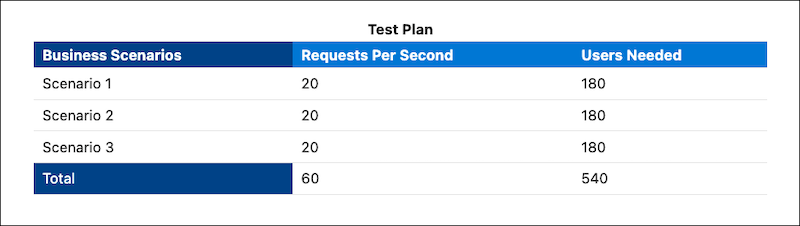
A copy of the test plan that you created in Scale Test (image shown for example only).
- Test start date and time
- Test end date and time
- The Org ID of the sandbox where the test occurs (scale tests are only permitted in sandboxes)
- Contact information for the person conducting the test (name, phone, email)
- The business case or scenario being tested (for example: holiday shopping event, new website launch)
- The business justification for testing
How to Run a Scale Test Above 120 RPS
Changes and customizations to your Salesforce implementation can impact performance. For testing above 120 RPS, use the Salesforce Scale Test product.
To get started:
- Read Measure Performance for Your Salesforce Org, then generate your test plan and schedule a testing window with Scale Test.
-
Contact your customer success representative or account executive for access. In Setup, search for Scale Test in the Quick Find box.
Scale Test is a paid add-on for full sandbox users. It validates a Salesforce implementation's ability to handle production-level traffic using metrics such as RPS, Experienced Page Time (EPT), and server-side traffic.
How to Create a Scale Test Plan
Before testing, review Salesforce Developer Limits. Exceeding these limits can result in throttling.
Steps to create your test plan:
- Identify the test scenarios and their success criteria.
- Visit the Test Plan Creation page in Scale Test to build a trial run based on production peak-hour usage. Greenfield customers and customers about to go live should design their own test plans using the RPS estimator.
- Run a baseline test with 50 users for a minimum of 30 minutes in a sandbox. Tests with 50 users or fewer usually do not require case approvals.
- Use the Trial Accuracy Checker to simulate production peak-hour traffic in a sandbox trial run.
- Use the RPS Estimator in Scale Test to calculate the expected peak load for inbound requests and API calls.
Frequently Asked Questions
What is the difference between a Performance Test and Scale Test?
A Performance Test is for testing at 120 RPS or below and is requested via the LAP process through Salesforce Support. Scale Test is for testing above 120 RPS and requires a paid add-on and coordination through your Account Executive.
My test was approved. Does that mean Salesforce considers my scripts valid?
Not necessarily. Salesforce Support does not validate testing methodology, debug testing scripts for errors, or confirm that scripts accurately reflect real-world production scenarios.
Support recommends for all test execution frameworks:
- No hard-coded locations to external files in scripts
- Parameterized URLs, usernames, and passwords
- Disabled single sign-on and no IP range restrictions for user profiles
- Five-second think time between requests
Can I run a scale test without prior approval?
No. All tests must be pre-approved. Unapproved testing is subject to throttling or blocking. Pre-approval allows Salesforce Support to schedule Site Reliability (SR) and Customer Centric Engineering (CCE) resources and to monitor the test. Even approved testing can be throttled if it degrades performance on the instance.
Can I get server logs for my scale testing?
Salesforce does not provide overall metrics or server logs for the testing period. For specific requests — such as CPU time for a particular process or details to troubleshoot an error — Support can sometimes extract a limited set of server log data. Work with your support agent.
Proactive Monitoring (PRoM) works alongside Scale Center as part of Salesforce's scalability suite. Use Scale Center for performance monitoring, analysis, and on-demand Lightning Experience Insights.
Yderligere ressourcer
Salesforce Help: Scale Test Overview
Trailhead: Scale Test Quick Look
Trailhead: Peak Load Tests with Scale Test
Vidensartikelnummer
000387059
Løste denne artikel dit problem?
Giv os besked, så vi kan forbedre os!
