Seleziona un'organizzazione
Hide the Salesforce 'Setup' Option From Specific Users
Data pubblicazione: Jun 1, 2026
Descrizione
Enabling the Improved Setup User Interface, personal information will now be available under 'My Settings', eliminating the need to access Setup.
Risoluzione
In order to hide “Setup” for your users, remove the permission called “View Setup and Configuration” from affected Custom Profile(s) or Permission Set.
Salesforce Classic:
1. Click on "Setup"
2. Expand the “Manage Users” by clicking the arrow icon before it
3. Click on “Profiles”
4. Select the Profile you want to edit by clicking its name
5. Click on “Edit”
6. Uncheck the “View Setup and Configuration” under the Systems Permission section
7. Click “Save”
Lightning Experience:
1. Click the Gear Icon
2. Click on “Setup”
3. Under “Users” click on Users
4. Under Users, click on “Profiles”
5. Click on the “Profile” you want to edit
6. Click on “Edit”
7. Uncheck the “View Setup and Configuration” under the Systems Permission section.
If not using the Enhanced User Profile, the "View Setup and Configuration" option can be found under the Administrative Permissions section. 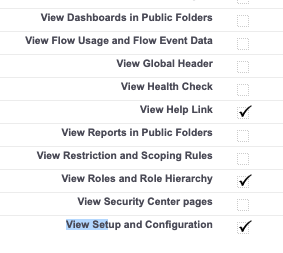

8. Click “Save”
Note: The 'Customize Application' profile permission may also cause access to the Setup if granted on profile or permission set.
Numero articolo Knowledge
000387276
Questo articolo ha risolto il problema?
Facci sapere, così possiamo migliorare!
