조직 선택
특정 사용자에게 '설정' 링크 숨기기
게시 일자: Jun 1, 2026
상세 설명
향상된 설정 사용자 인터페이스를 활성화하면 'My Settings(내 설정)'에서 개인 정보에 접근할 수 있으므로 설정에 액세스할 필요가 없습니다.
솔루션
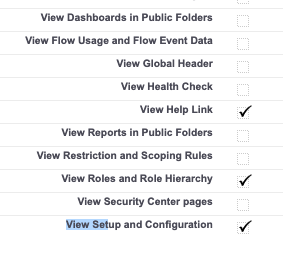
사용자에게 "Setup(설정)"을 숨기려면 해당 사용자 정의 프로필 또는 권한 집합에서 "View Setup and Configuration(설정과 구성 보기)" 권한을 삭제하세요.
Salesforce Classic:
1. "Setup(설정)"을 클릭합니다
2. 앞에 있는 화살표 아이콘을 클릭하여 "Manage Users(사용자 관리)"를 확장합니다
3. "Profiles(프로필)"를 클릭합니다
4. 이름을 클릭해 편집하려는 프로필을 선택합니다
5. "Edit(편집)"을 클릭합니다
6. Systems Permission(시스템 권한) 섹션 아래에서 "View Setup and Configuration(설정과 구성 보기)"의 선택을 해제합니다
7. "Save(저장)"를 클릭합니다
Lightning Experience:
1. 기어 아이콘을 클릭합니다
2. "Setup(설정)"을 클릭합니다
3. "Users(사용자)" 아래에서 Users(사용자)를 클릭합니다
4. Users(사용자) 이름을 클릭 한 후, "Profiles(프로필)"를 클릭합니다
5. "Edit(편집)"을 클릭합니다
6. Systems Permission(시스템 권한) 섹션 아래에서 "View Setup and Configuration(설정과 구성 보기)"의 선택을 해제합니다
7. "Save(저장)"를 클릭합니다

고급 프로필 사용자 인터페이스 활성화를 사용하지 않는 경우 “설정과 구성 보기(View Setup and Configuration)” 옵션은 관리 권한(Administrative Permissions) 섹션에서 찾을 수 있습니다.
참고: 'Customize Application(응용 프로그램 사용자 정의)' 프로필 권한이 프로필 또는 권한 집합에 부여되어 있다면 사용자가 설정에 액세스할 수도 있습니다.
Knowledge 기사 번호
000387276
이 기사를 통해 문제를 해결했습니까?
개선을 위한 의견을 보내주세요.
