조직 선택
Open phone number as a link in Marketing Cloud Email
게시 일자: Nov 4, 2025
상세 설명
You can hyperlink a phone number using both text-based and image-based links. Learn the steps for both methods below.
Note: "Click-to-Phone" links are not tracked just as "mailto" links are not. This is because the action is internal to the Subscriber's phone system, and doesn't involve routing traffic to an external server, like normal HTTP links do. Yahoo Mail (and some webmail clients) often disable or do not support certain clickable links, including tel: links, for security or compatibility reasons.
솔루션
Email Editor
1. Open the Email Editor within any email.
2. Click any Content Box within an email to be edited.
3. Click Modify Content.
4. Enter the phone number.
5. Highlight the Phone Number.
6. Click Insert Link.
7. In the "Link To" dropdown, click Other.
8. In the "Link URL" field, Enter "telephone number." For example, tel:555-555-5555.
9. Click OK | Save.
Note:
You are not required to add any area code to the phone number.
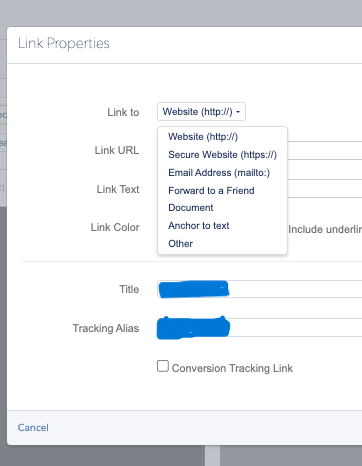
Image-based Links
1. Open Email Editor within any email.
2. Click any Content Box within an email to be edited.
3. Click Modify Content.
4. Highlight the existing image.
5. Click Insert Link.
6. In the "Link To" dropdown, click Other.
7. In the "Link URL" field, Enter "telephone number." For example, tel:555-555-5555.
8. Click OK | Save.
추가 자원
Related discussion: https://trailhead.salesforce.com/trailblazer-community/feed/0D54V00007OuNNsSAN
Related read: Marketing Cloud Email Does Not Display Correctly on a Mobile Device
Knowledge 기사 번호
000387317
이 기사를 통해 문제를 해결했습니까?
개선을 위한 의견을 보내주세요.
