Salesforce Classic において、取引先責任者の [取引先名] 項目を編集する際、[取引先名 ルックアップ] ボタンから取引先を選択した場合と、詳細画面でのインライン編集により取引先を入力した場合では、連動する住所情報の自動入力の挙動が次のように異なります。
[取引先責任者の編集] 画面から変更する場合
[取引先責任者の編集] 画面を開き、[取引先名 ルックアップ] ボタン(虫眼鏡アイコン)をクリックして取引先を選択すると、取引先に登録されている住所情報の各項目(国、郵便番号、都道府県、市区郡、町名・番地など)が自動的に入力されます。
詳細画面からインライン編集する場合
詳細画面(ダブルクリックまたは鉛筆アイコン)から [取引先名] 項目をインライン編集で直接入力した場合は、取引先に関連付けられている住所情報は自動入力されません。住所情報が自動コピーされないため、必要に応じて住所情報を手動で入力する必要があります。
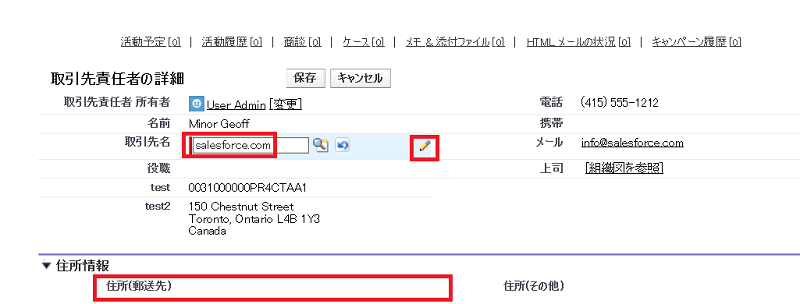
住所情報へ自動的に取引先の情報を反映させたい場合は、レコードの [編集] ボタンから標準の編集画面を開き、ルックアップボタンを使用して取引先を選択してください。
000387411

We use three kinds of cookies on our websites: required, functional, and advertising. You can choose whether functional and advertising cookies apply. Click on the different cookie categories to find out more about each category and to change the default settings.
Privacy Statement
Required cookies are necessary for basic website functionality. Some examples include: session cookies needed to transmit the website, authentication cookies, and security cookies.
Functional cookies enhance functions, performance, and services on the website. Some examples include: cookies used to analyze site traffic, cookies used for market research, and cookies used to display advertising that is not directed to a particular individual.
Advertising cookies track activity across websites in order to understand a viewer’s interests, and direct them specific marketing. Some examples include: cookies used for remarketing, or interest-based advertising.
