組織を選択
標準オブジェクトおよびカスタムオブジェクトの Chatter フィードの活動をレポート
公開日: Apr 3, 2026
説明
カスタムレポートタイプを作成することで、取引先、ケース、リード、商談などのフィード投稿を追跡できます。
Chatterフィード投稿数や投稿ユーザの種別も確認可能です。
注 : ユーザによって作成された投稿のみがレポート結果に反映されます。 [フィード追跡] によって自動的に作成された投稿は、オブジェクトのフィードに関するレポートには表示されません。
解決策
例えば、ケースとケースフィードのカスタムレポートタイプ作成するには、以下のとおりに操作します:
1. [設定] から、クイック検索ボックスに「レポートタイプ」と入力し、[レポートタイプ] を選択します。
2. [新規カスタムレポートタイプ] をクリックします。
3.主オブジェクトとして [ケース] を選択します。
4. [表示ラベル]、[API 参照名]、[説明]、[カテゴリに格納] 、[可用性を設定]を設定し、[次へ] をクリックします。
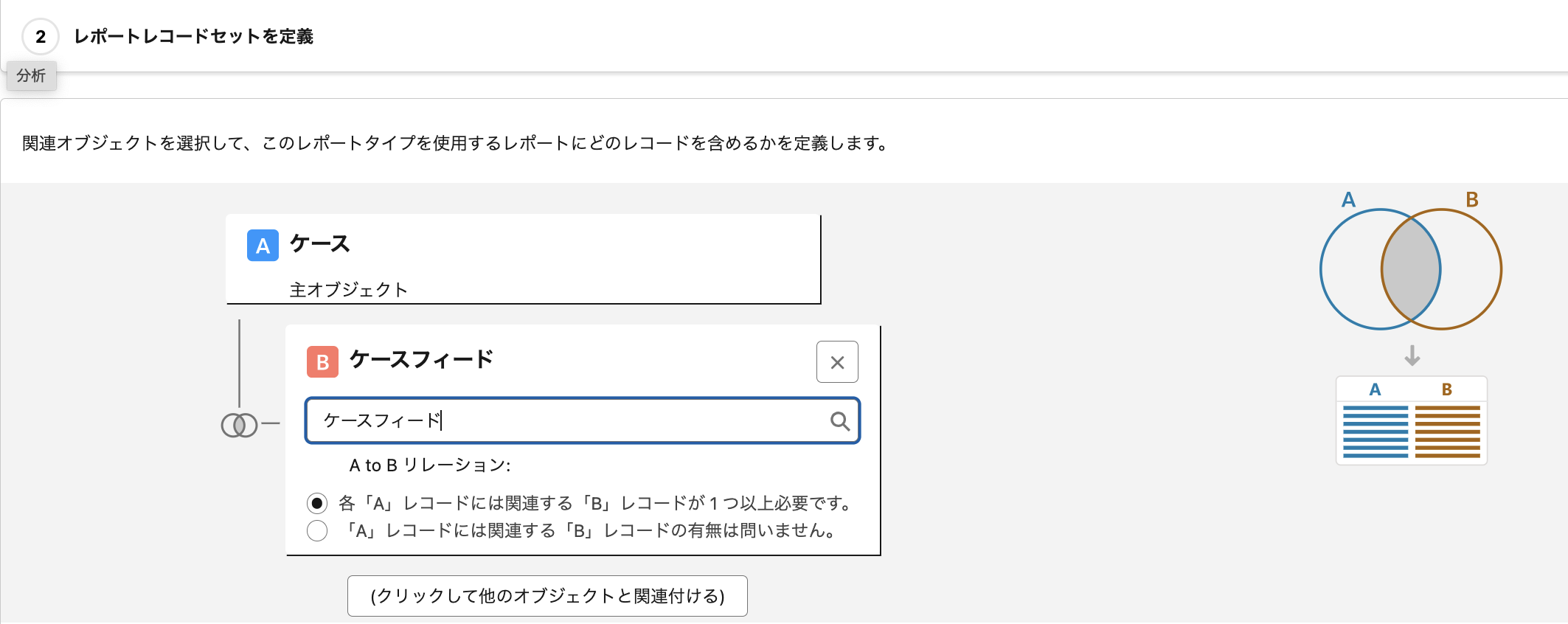
5. 下記のスクリーンショットのように、B オブジェクト (関連オブジェクト) で [ケースフィード] を選択します。(カスタムオブジェクトの場合は、[フィード: 主オブジェクト名] の形式で表示されます。)
6. [保存] をクリックします。
2. [新規カスタムレポートタイプ] をクリックします。
3.主オブジェクトとして [ケース] を選択します。
4. [表示ラベル]、[API 参照名]、[説明]、[カテゴリに格納] 、[可用性を設定]を設定し、[次へ] をクリックします。
5. 下記のスクリーンショットのように、B オブジェクト (関連オブジェクト) で [ケースフィード] を選択します。(カスタムオブジェクトの場合は、[フィード: 主オブジェクト名] の形式で表示されます。)
6. [保存] をクリックします。
カスタムレポートタイプの作成が完了すると、通常通りレポートを作成できます。レポートタイプオプションのリストから、作成したカスタムレポートタイプを選択します (通常はリストの最下部に表示されます)。
関連情報:
Lightning Experience でのレポートの作成
Salesforce Classic でのレポートの作成
Salesforce サポート YouTube 関連動画:
Use Custom Report Types to Build Powerful Salesforce Reports (英語)
ナレッジ記事番号
000387497
この記事で問題は解決されましたか?
ご意見をお待ちしております。
