Выбрать организацию
Report on Chatter Feed Activity for Standard and Custom Objects
Дата публикации: Apr 3, 2026
Описание
You can monitor Record feed engagement on Standard and Custom Objects by creating a Custom Report Type with the object's feed as the secondary object.
Use this Custom Report Type to report feed activity for all standard Objects (excluding Tasks and Events) that have feed tracking enabled (such as Accounts, Cases, Leads, Opportunities, and Custom Objects). You’ll also be able to track the number of feed edits and see what type of users are editing feeds.
Note: Only posts created by Users are reflected in report results. Posts automatically created through feed tracking will not appear in reports on an object's feeds.
Решение
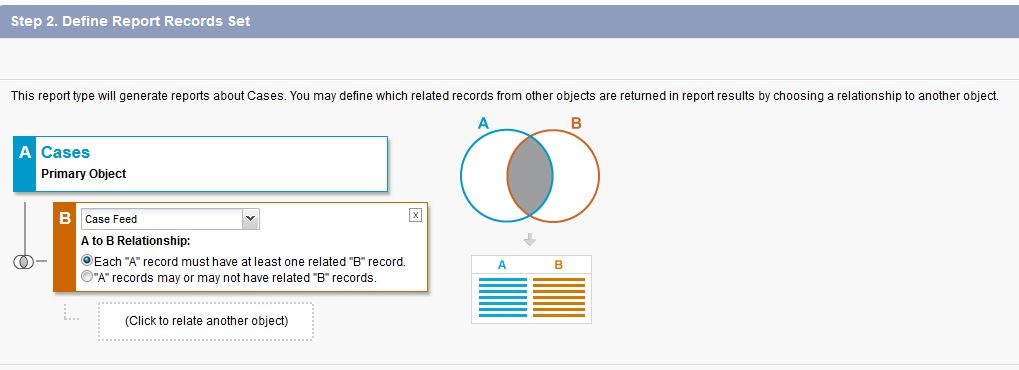
For example, here's how to create a custom report type for Cases and Case Feeds:
- From Setup, enter Report Types in the Quick Find box, then select Report Types
- Click New Custom Report Type
- Select Cases as the Primary object
- Enter a Label, Name, Description, and Category, then click Next.
- Select Case Feed as the B object per the screenshot below (for custom objects, the Feed object will appear in the form of "Feed: Primary Object Name")
- Click Save
Once done with creating the custom report type, you may now create a report as usual. Select the custom report type you just created from the list of report type options, usually seen at the bottom of the list.
Дополнительные ресурсы
Build a Report in Lightning Experience
Build a Report in Salesforce Classic
Related Salesforce Support YouTube Video:
Use Custom Report Types to Builder Powerful Salesforce Reports
Номер статьи базы знаний
000387497
Эта статья решила вашу проблему?
Оставьте свой отзыв, чтобы мы могли стать лучше!
